How to Change Clothes Color in a Video Without a Reshoot
Changing clothes color in a video is difficult to keep the real edges, folds, texture. Read this guide to get 5 methods to do that.


Changing clothes color in a video is a practical way to showcase multiple colorways for an apparel brand. No need to re-book the model, studio, and editor for every color.
But the method you pick determines whether the result looks intentional or obviously edited. The wrong approach gives you crawling edges, flattened fabric texture, or a hue shift that bleeds onto skin and background.
Below are 5 ways to change clothing color — or a dress's color — in a video, including free mobile edits up to full VFX, plus the approach that actually matches how apparel sellers work.
Key Takeaways
Fastest free method: Chroma key in CapCut. Works best on solid, saturated garment colors.
Most realistic result: HSL masking with frame tracking — but needs a steady camera and a garment color that doesn't overlap with skin or background.
Sellers with product images but no footage: Generating video from photos is faster than editing clips you'd have to shoot first.
Why Changing Clothes Color in a Video Is Harder Than in a Photo
Changing the color of clothes in a video means recoloring a moving target. In a photo you paint one mask and you're done. In a video, the garment bends, folds, and moves through changing light across thousands of frames, and your mask has to follow all of it.
Two things decide whether a recolor looks real:
Edges and folds — where fabric creases, a flat color fill reads as a sticker.
Texture — denim, ribbed knits, and prints carry grain and shadow that a single hue shift wipes out.
For apparel sellers, this matters practically: a recolor that looks fake on a product listing page costs you conversions and increases return rates — buyers who feel misled about a color will send it back.
Notes: The cleanest recolor results come from garments with a single, saturated color and even studio lighting. Prints, pastels, sheer fabrics, and lace are the hardest to recolor convincingly — and also the hardest to fake on a listing page without buyers noticing.
Method 1: Chroma Key (Green Screen) Color Swap
This is the fastest free route, and it's behind most "dress changes color" clips you've seen on TikTok.
Record in a solid garment color — ideally a saturated green or blue, against a contrasting background so the editor can isolate it.
Drop the clip into CapCut and open the Chroma Key tool (found under Overlay, select the overlay clip, use Chroma Key in the editing toolbar).
Pick the garment color with the eyedropper, then raise the similarity/intensity slider until the fabric drops out.
Place a new-color solid or texture layer underneath the keyed clip so the new color shows through the garment.
Tidy the edges — soften the key and mask out skin, hair, and background so they don't get recolored too.
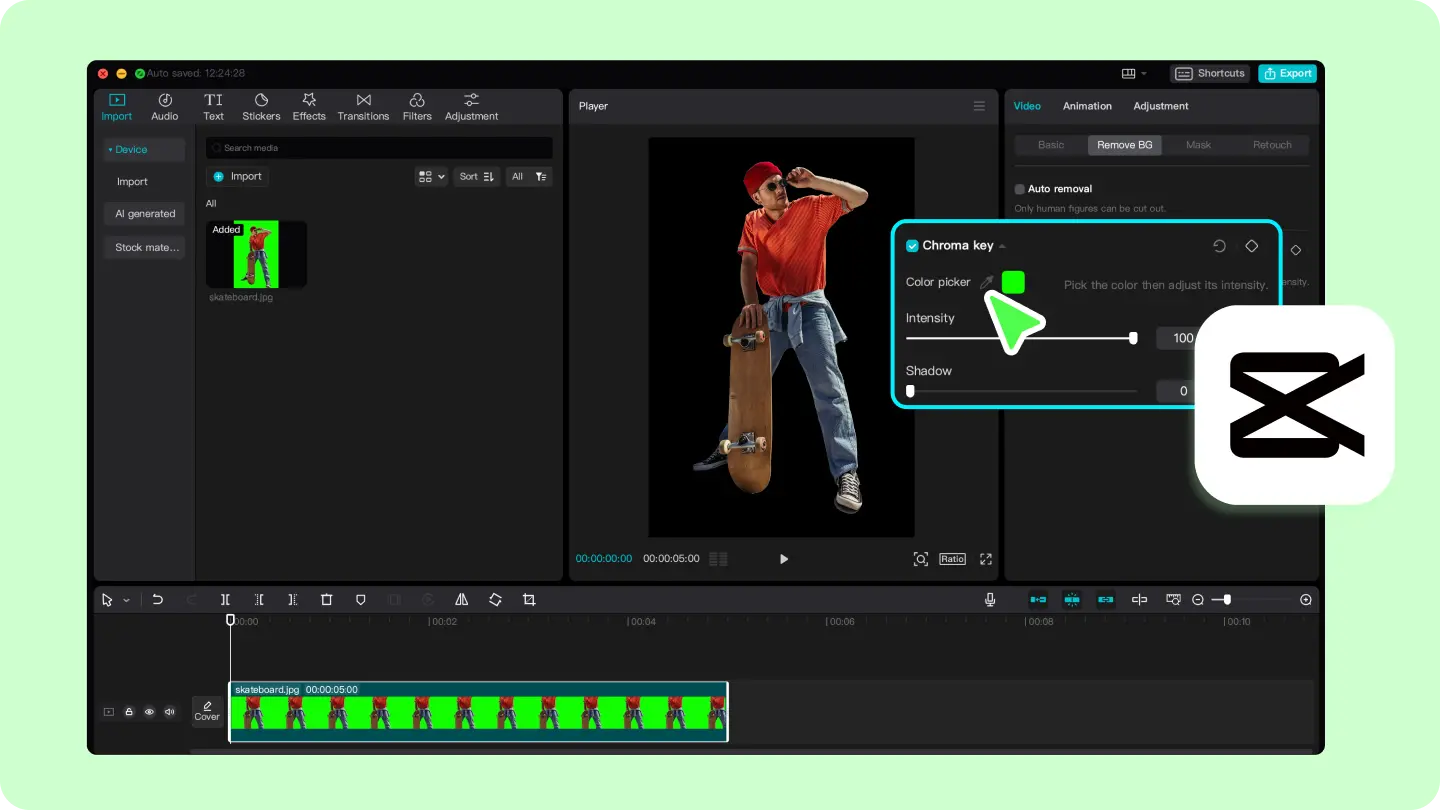
Best for: Creating a quick colorway teaser for social media (TikTok, Reels, Shorts) before a product launch, or testing whether a color variant generates engagement before committing to a full shoot. Notes: it only works if the original garment is a clean, distinct color — and the result looks slightly flat.
Method 2: HSL / Hue-Saturation Masking
This is the "magic dress" effect done properly — a targeted hue shift instead of a flat fill.
Open DaVinci Resolve's HSL Qualifier (Color page → Qualifier panel) — this is the most precise option for isolating a garment color without bleeding onto skin or background.
If you're already in Adobe's ecosystem, Premiere Pro's Lumetri Color → HSL Secondary works on the same principle.
CapCut has HSL sliders but lacks true secondary color selection, making it better suited for Method 1 than this workflow.
You can use this method for: refreshing an existing hero video for a new colorway launch — for example, updating a lookbook clip or a Shopify product video from last season's color to a new one, when the garment is a solid color and the original footage is steady.
Method 3: Shoot the Same Shot Twice and Cut
This only works if you physically own both colorways — but if you do, no software method beats it for realism. The result is real footage, not a recolor.
Lock your camera — same angle, same distance, same lighting for both takes.
Film the identical action in each color — a walk-through, a turn, or a fit-check.
Cut between the two takes on the same beat, or hide the switch with a whip-pan or hand-wipe.
Sync the takes so the model's body position lines up.
Best for: fit-checks and OOTD clips where a hard cut reads as an intentional reveal. And product listing videos and ad creatives where you physically stock both colorways.
Method 4: AI Clothes Color Changer Tools
AI tools split into two very different jobs.
Stills — strong. An AI clothes color changer auto-detects the garment, lets you pick a color or paste a HEX code, and rebuilds fabric texture and shadows. For product photos this is now genuinely good, and you can batch an entire catalog.
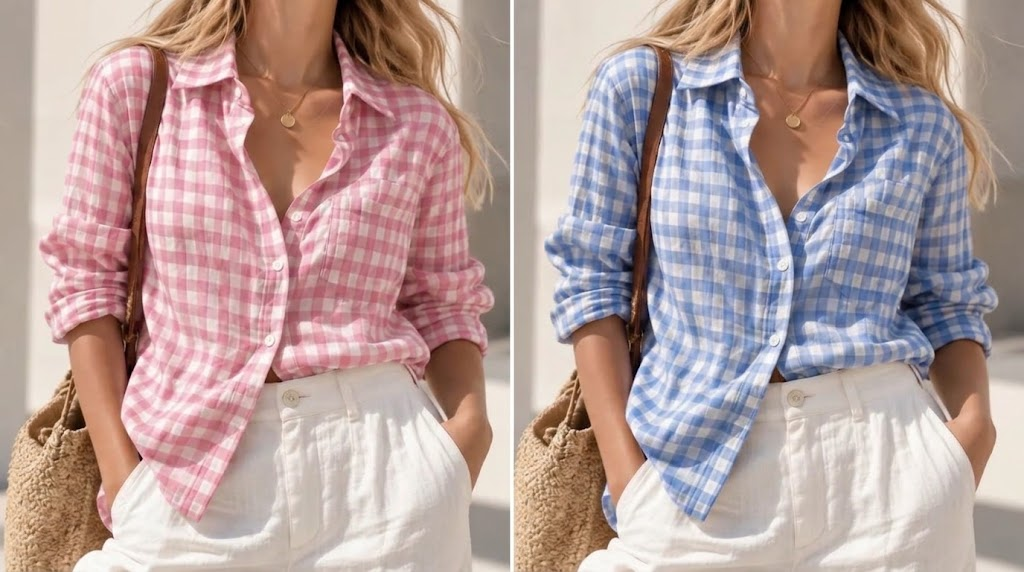
Video — mixed. For motion, AI video cloth-changers can swap an outfit across a short clip, but edges, hands crossing the body, and fast movement still break them. Real users report that edges, hands, and fast motion still break the result on longer clips. Heavy generative workflows require significant compute — render times and hardware requirements vary widely by tool and clip length, and have been improving rapidly as AI video tools evolve.
You can usually change clothes color in a video by AI with the steps below:
Upload the photo or short clip.
Let the tool auto-mask, or brush in the garment area manually.
Choose a target color or a reference image.
Export and inspect the seams, hands, and shadow lines at full speed.
Best for apparel sellers: Generating colorway product stills for Shopify, Amazon, and marketplace listings at scale — especially useful for high-SKU catalogs where shooting every color is not feasible. For video, limit to short clips with minimal movement for best results — check your specific tool's recommended clip length.
Method 5: Use Koozee to Change Clothes Color and Create Videos
Koozee is built for apparel sellers to produce visualizations, including flat lay, Invisible mannequin, model virtual try on, change clothes color, model poses, and more.
Here are the simple steps to use its clothes color changer: upload target outfit and reference color image, briefly describe your requirements, and click generate.
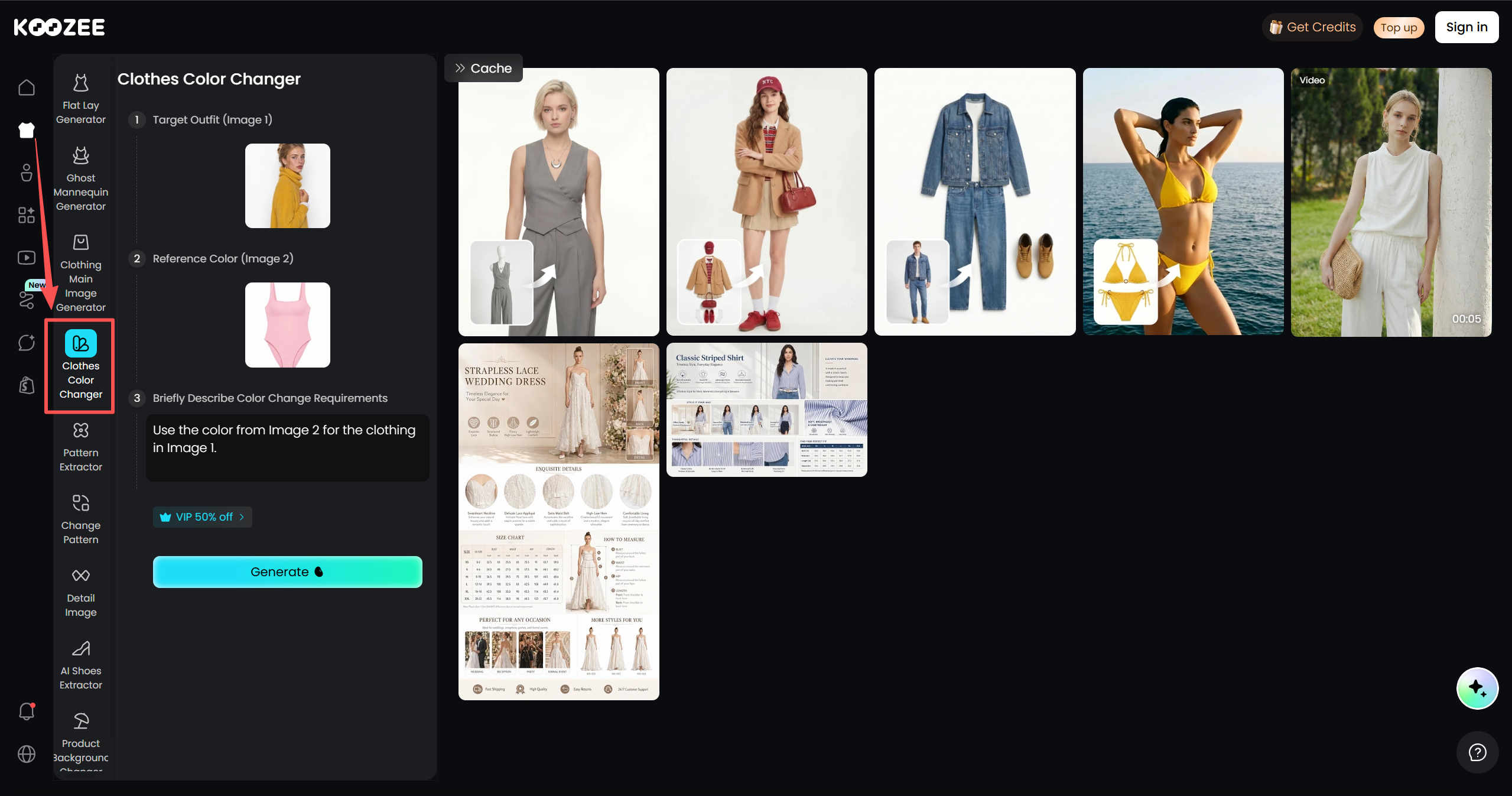
Then add the photo you just generated to its fashion video creator, and you will get a refreshed walking video with clothes color changed.
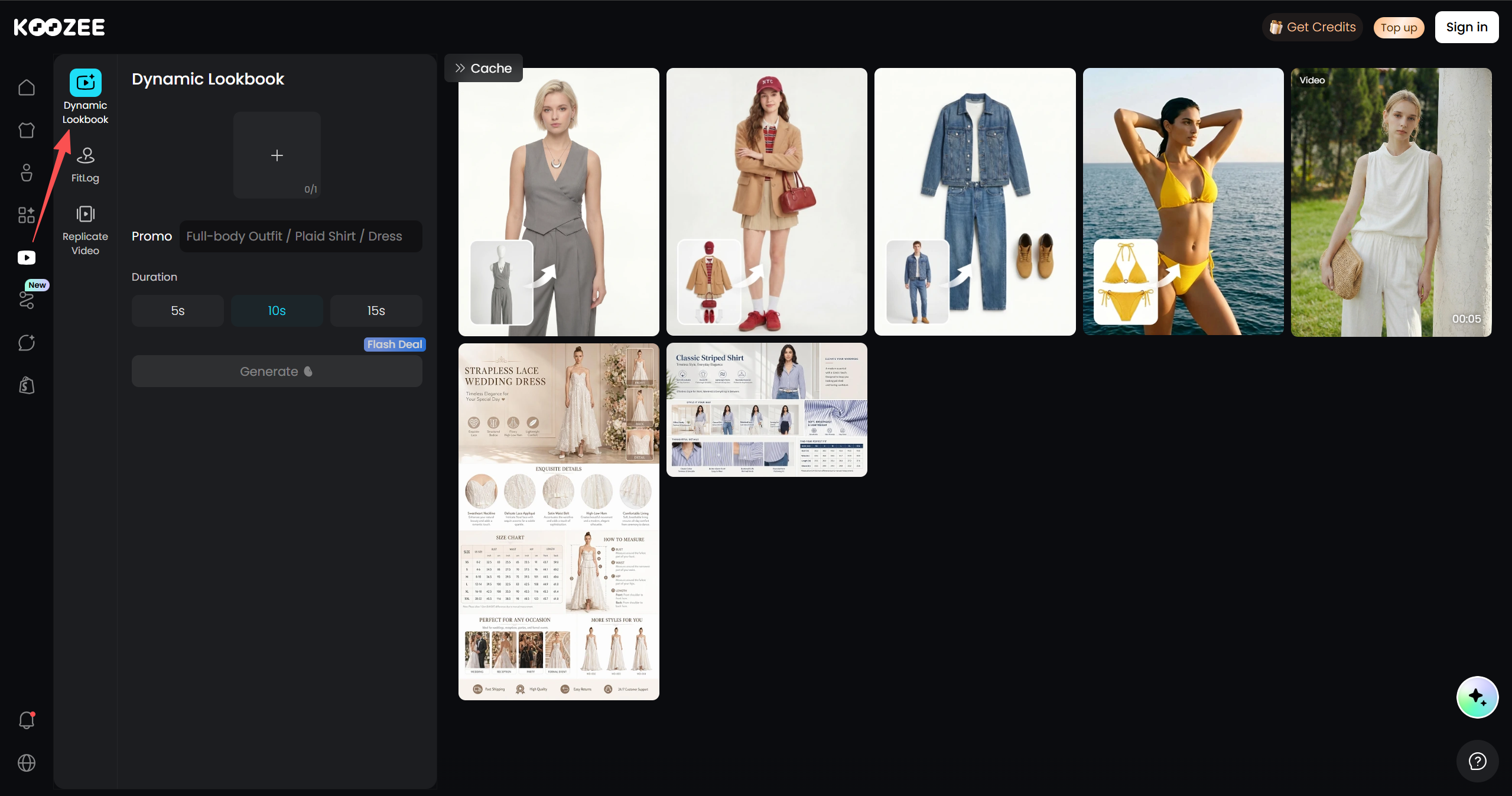
Besides, connect to your Shopify store, upload a product image for any colorway, and generate on-model try-on visuals, and product videos — then preview the results and publish only the assets you approve back to the product page, without the usual download-rename-reupload cycle.
Which Method Should You Use?
| Method | Best for | Skill level | Realism on moving fabric |
| Chroma key | Quick social reveals, one clean-color garment | Beginner | Medium |
| HSL / hue-saturation mask | Single-color garments, steady shots | Intermediate | High |
| Shoot twice & cut | Fit-checks, OOTD, colorways you already own | Beginner | Perfect |
| AI color changer (include Koozee) | Colorway stills, short clips | Beginner | High on stills, mixed on video |
Common Mistakes to Avoid
Recoloring printed or sheer fabric. Prints, sheers, and pastels rarely survive a hue shift — edges crawl and texture flattens. For listings, a failed recolor on lace or sheer fabric is immediately visible to buyers — better to shoot it or generate from a product image.
Spending hours on a recolor when you could generate from a product image. For sellers with 10+ colorways, the time cost of manual recoloring per SKU adds up fast.
Letting the video disagree with the listing. If the clip shows a colorway you don't actually stock, you'll pay for it in return. Match the recolor to your real SKU colors.
Skipping the final review. Always watch the finished clip at 1× speed — small errors hide at 100% zoom and show up in playback. Most shoppers view product videos on phones — a recolor that looks fine on desktop may show color banding or edge artifacts on a smaller screen.
FAQ
Can you change the color of a dress in a video for free? Yes. The chroma-key method with a mobile editor like CapCut or InShot costs nothing, and shooting the same clip twice in two colors is free as well. Free AI color changers cover stills well; video AI usually gates quality behind a paid plan or heavy hardware.
How do you change the color of your clothes in a photo, not a video?
It's much easier. Upload the photo to an AI clothes color changer. With only one frame, the tool can rebuild fabric texture and shadows cleanly.
Why does recolored clothing look fake? Almost always because the mask is flat. A single solid fill erases the shadows and creases that tell your eye the fabric is real. Fix it by shifting hue on an HSL layer instead of filling solid, and keeping saturation and luminance close to the original.
You May Be Interested

6 Best AI Video Ad Generators in 2026

Best AI Face Swap Video Generators for Apparel Sellers

7 Best AI Video Enhancers for Ecommerce in 2026
