How to Make Fashion TikTok Videos From Photos: 4 Methods for Apparel Sellers
Learn how to make fashion TikTok videos from photos with 4 practical methods — from TikTok's built-in tools to AI fashion video platforms for apparel sellers.


You don’t need video footage to create fashion TikTok content. With just product photos, you can turn static images into engaging TikTok videos in minutes — no filming, no editing skills required.
If you’re an apparel seller, this situation is probably familiar: your product photos look great, but you have little to no video content — and TikTok is built around short-form visual content, so apparel sellers often need more than static product photos to stay visible. But creating video for every product is expensive, time-consuming, and nearly impossible to scale across dozens of SKUs.
In this guide, I’ll walk you through 4 practical methods, ranked by speed, effort, and scalability, so you can choose the workflow that actually fits your business.
Key Takeaways
TikTok has built-in tools: Photo Mode lets you create fashion videos from photos directly in the app — no editing software required, ideal for getting started in minutes.
CapCut gives you creative control: TikTok's companion editing app adds transitions, text overlays, and trending templates that make photo-based fashion videos look professionally produced.
AI image-to-video tools animate still photos: Tools like Runway, Pika, and Luma Dream Machine can add motion to static product images — turning a flat-lay into a subtle pan or a model shot into a moving clip. These tools are better suited for creative or social content, not for accurate product representation. For e-commerce, always double-check that the generated video matches the actual product.
AI fashion video platforms go further: Purpose-built platforms like Koozee turn product photos into dynamic lookbooks, fit-check videos, and viral-style outfit clips — designed specifically for apparel e-commerce sellers.
Start with the method that matches your volume: One product to promote? TikTok's in-app tools are enough. Fifty SKUs to refresh weekly? AI platforms that streamline much of the product-photo-to-video workflow.
Method 1: TikTok's Built-in Photo Mode — Fastest Way to Get Started
If you've never made a TikTok from photos before, start here. Photo Mode (sometimes called "Photo Carousel" or "Image Slideshow") is TikTok's native feature that lets you upload a series of photos and have them play as a swipeable or auto-advancing video. It requires zero editing experience and takes under five minutes.
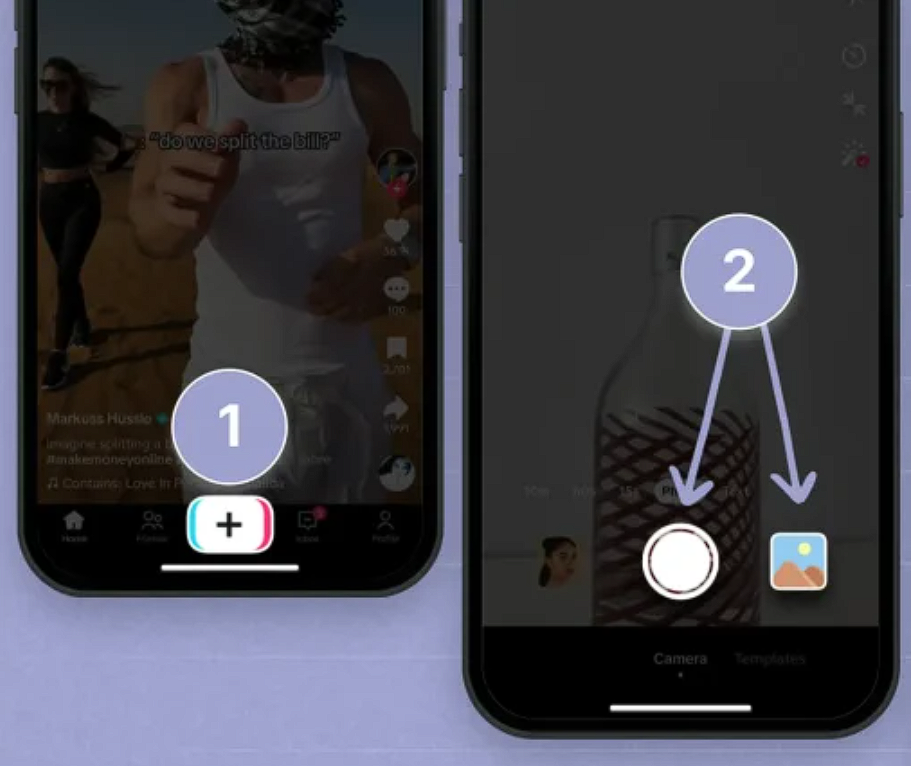
How to use it:
Open TikTok and tap the "+" button to create a new post.
Tap "Upload" (or "Photos") and select multiple images from your camera roll — TikTok typically allows up to 35 photos, depending on your app version and region.
Tap "Next" and TikTok will present your photos as either a swipeable carousel or auto-playing slideshow depending on the format.
Add a trending sound — this is critical for reach. Tap "Sounds" and browse TikTok's trending list or search for music popular in the fashion niche.
Apply text overlays to highlight key selling points: fabric details, available sizes, price, or a call to action like "Link in bio."
Adjust photo duration — shorter clips (1.5–2 seconds per image) keep viewers engaged; linger too long and they swipe away.
Write a caption with relevant hashtags (e.g., #OOTD, #NewArrival, #FashionTikTok) and post.
Best for:
Quick product announcements or "just dropped" posts
Sellers testing TikTok for the first time
Single-product highlights where 5–10 photos already exist
💡 Pro tip: Your first photo is your hook. Lead with the most eye-catching shot — a close-up of texture, a bold color, or a stylized flat-lay — not a logo or a plain product image. TikTok users decide whether to keep watching in the first 1.5 seconds.
⚠️ Limitation: Photo Mode offers limited creative control. You can't add custom transitions, animated text, or effects beyond TikTok's built-in filters. For more polished results, try Methods 2–5.
Method 2: CapCut & External Editing Apps — More Creative Control
When you're ready to move beyond TikTok's built-in tools, CapCut is the natural next step. Owned by ByteDance (TikTok's parent company), CapCut integrates directly with TikTok and offers a much wider range of transitions, text animations, effects, and audio tools — all optimized for short-form vertical video.
Other solid alternatives include Canva (great for brand-consistent templates), InShot (user-friendly for beginners), and VN Video Editor (more advanced controls with no watermark on the free tier).
How to create a fashion video from photos in CapCut:
Open CapCut and tap "New Project."
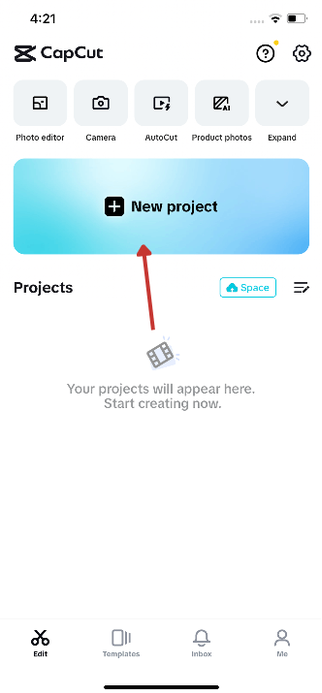
Select your product photos. Arrange them in the order you want them to appear.
Add transitions between each photo — "Smooth Zoom," "Fade," and "Glitch" work well for fashion content.
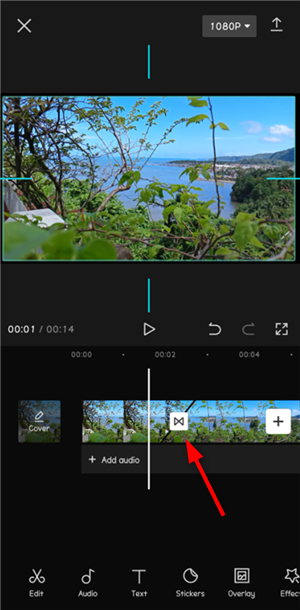
Apply text overlays with animated entrance and exit effects. Use text to call out product features, pricing, or a CTA.
Add background music from CapCut or TikTok’s commercial music library.
Use keyframe animations to add subtle motion: a slow zoom-in on a product detail, a pan across a flat-lay, or a rotation effect on a model shot.
Export at 1080p, 30fps (or 60fps for smoother motion) and upload to TikTok.
Best for:
Sellers who post 3–5 TikToks per week and want a reusable editing workflow
Creating brand-consistent templates you can duplicate for each new product
Fashion videos that need custom text overlays, animated price tags, or transition effects
💡 Pro tip: Create one "master template" in CapCut with your brand's fonts, colors, and preferred transitions. For each new product, duplicate the template, swap in new photos, update the text, and export. This cuts editing time from 20 minutes to under 5 minutes per video.
Method 3: AI Image-to-Video Tools — Turn Product Photos into Moving Clips
This is where things get interesting for apparel sellers. A new category of AI tools can take a static photo and generate a short video clip — adding realistic camera motion, fabric movement, or even full-scene animation.
For fashion content, these tools are especially powerful because they solve the biggest gap between product photos and video: motion. A flat-lay dress photo becomes a slow pan. A ghost mannequin shot becomes a subtle rotation. A model photo gains natural-looking fabric sway.
Notable tools in this category:
| Tool | Best For | Key Strength |
| Runway | Cinematic motion from stills | High-quality output, fine control over camera movement |
| Pika | Social-first effects and transitions | Fast generation, trending effect styles |
| Luma Dream Machine | Smooth camera motion | Natural-looking pans and dolly zooms |
| Kling AI | Budget-friendly motion | Affordable pricing, solid fabric-motion rendering |
| WearView | Animated flat-lays and mannequin shots | Built specifically for apparel product images |
How to use this approach:
Start with your best product photo — high resolution, good lighting, clean background.
Upload to your chosen AI tool and select a motion type (pan, zoom, rotate, or fabric simulation).
Generate the clip. Most tools produce 2–5 second clips per image.
Combine multiple AI-generated clips in CapCut or directly in TikTok, adding music and text.
Post as a short lookbook-style video or a single-product highlight.
Best for:
Turning flat-lay and ghost mannequin photos into dynamic product showcases
Sellers who want motion-based content but don't have video footage
Creating "alive" product images that stand out in the TikTok feed
⚠️ Important: AI-generated clips can sometimes produce unnatural motion or fabric distortion. Always review output before posting. For best results, use clean product photos with clear garment edges and minimal background clutter.
📌 Note on AI labeling: TikTok may require or prompt creators to label AI-generated or significantly edited content. Follow TikTok’s current AI-generated content policy and label AI content when required.
Method 4: AI Fashion Video Platforms — Full Workflow from Product Photo to Social Video
For apparel sellers managing multiple products and posting regularly, the methods above share a common limitation: they require you to manually process each product image one at a time. When you're juggling 30, 50, or 100+ SKUs, that manual workflow breaks down.
This is where AI fashion video platforms come in — tools built specifically to turn clothing product images into multiple types of fashion videos in one workflow. Instead of exporting from one tool, editing in another, and uploading to TikTok manually, these platforms handle the product-photo-to-video pipeline end-to-end.
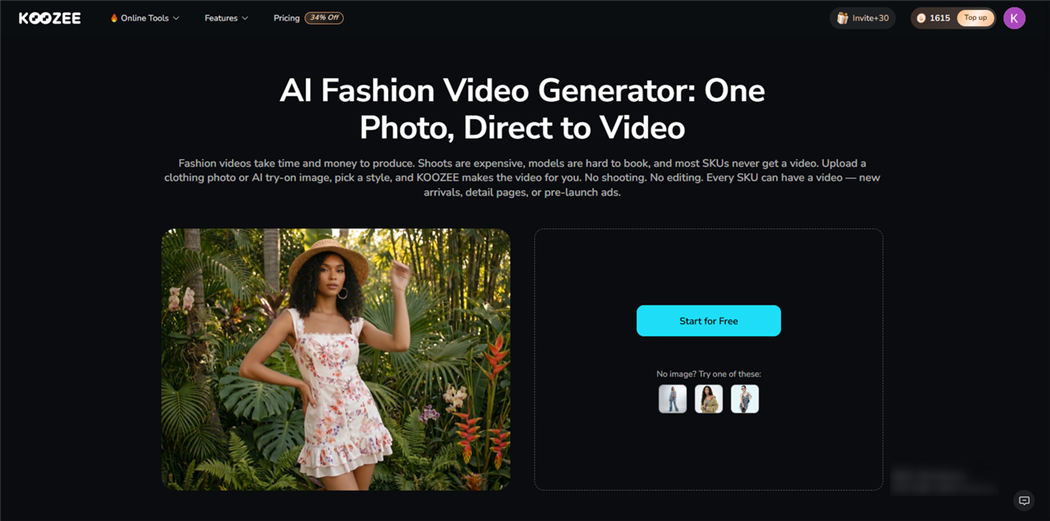
One platform designed for this exact use case is Koozee, an AI visual production tool built for apparel e-commerce sellers. Unlike generic AI image or video tools, Koozee focuses on the specific video formats that apparel sellers need for social commerce:
Dynamic Lookbooks: Turn a set of product photos into a styled lookbook video with model variations, scene changes, and outfit sequences — the kind of content that performs well as a TikTok fashion edit.
Fit Check / OOTD Videos: Upload an outfit photo and generate a fit-check-style video, a format that consistently trends on TikTok's fashion side.
Short Outfit Clips: Create short outfit clips for TikTok, Reels, Shorts, and ad creatives.
Why this approach fits an apparel seller's TikTok workflow:
The real bottleneck for most sellers isn't learning how to edit — it's producing enough video content, consistently, across all their products. A single shirt might need a lookbook clip, an OOTD-style edit, and a detail showcase — and when you multiply that by your catalog size, the manual methods in Methods 1–4 become unsustainable.
AI fashion video platforms collapse that production time. You upload product photos once and generate multiple video formats from the same inputs. For Shopify sellers, platforms like Koozee also connect directly to your store, letting you pull existing product images into the video workflow without downloading and re-uploading files.
✅ Recommended workflow: Connect your Shopify store → select a product → generate a lookbook video, an OOTD clip, and a detail showcase → pick the best one for TikTok → review and post. Repeat for your next product. This reduces repetitive editing work and makes it easier to create video assets across a larger apparel catalog.
Best for:
Shopify, Amazon, and marketplace apparel sellers with 20+ active SKUs
Brands that need multiple video formats (lookbooks, OOTD, product showcases) from the same product photos
Sellers who want to post 5–7 TikToks per week without spending 10+ hours editing
Lingerie, swimwear, and fitted-apparel sellers — categories where traditional video production is especially expensive
What Type of Fashion TikTok Videos Perform Best for Apparel Brands?
Knowing how to make fashion TikTok videos from photos is half the equation. The other half is knowing what kind of videos to make. Based on TikTok's current fashion content landscape, these formats consistently drive engagement for apparel brands:
| Video Format | What It Is | Why It Works |
| Lookbook / Collection Edit | A sequence of outfit photos set to trending music, often with quick cuts and transition effects | Low production barrier, high visual impact — lets viewers see multiple products in one scroll |
| "Ways to Style" / Styling Edit | One product shown in 3–5 different outfit combinations or scenes | High save rate — viewers bookmark for outfit inspiration |
| Detail Showcase | Close-up photos of fabric, stitching, or unique design elements, zooming in/out | Builds product confidence — shows quality that static listing images can't convey |
| Before / After Transformation | Flat-lay → on-model, or unstyled → styled variations | The contrast grabs attention and demonstrates product fit |
| Fit Check / OOTD | Outfit showcase with text overlays describing fit, sizing, and feel | Highly engaging format — viewers actively look for these to inform purchase decisions |
💡 Pro tip: Mix formats. Don't post five lookbooks in a row. Alternate between a lookbook, a detail showcase, a styling edit, and a fit check. Variety keeps your profile feed from feeling repetitive and gives different products different ways to shine.
Method Comparison: Which Approach Fits Your Workflow?
| Method | Time per Video | Creative Control | Best for Catalog Size | Cost |
| TikTok Photo Mode | 3–5 min | Low | 1–5 products | Free |
| CapCut / External Apps | 10–20 min | High | 5–20 products | Free–$10/mo |
| AI Image-to-Video Tools | 15–30 min | Medium–High | 5–30 products | $10–$30/mo |
| AI Fashion Video Platforms | 5–10 min | Medium–High | 20+ products | Free trial available; paid plans vary |
Frequently Asked Questions
Does AI-generated fashion content work on TikTok?
Yes — as long as it looks natural. TikTok rewards watch time and engagement, not how the content is made. The key is using tools that keep clothing details realistic.
How do brands use AI for TikTok?
Mainly to turn product photos into lookbooks, create model try-ons, and generate outfit variations. The best results come from using AI as a repeatable workflow.
How can I create fashion TikToks on a budget?
Start with TikTok Photo Mode (free), then use CapCut (free). AI tools often offer free trials. The biggest savings come from avoiding expensive photoshoots.
What content works best for clothing brands?
Lookbooks, styling edits, and fit-check (OOTD) videos. These match what users already like to watch on TikTok.
Can I create videos without showing my face?
Yes. Use flat-lays, mannequin clips, or AI-generated models. Many sellers focus only on the product.
How many photos do I need?
5–10 photos for a simple video. For better results, use 3–5 images per outfit from different angles.
What’s the biggest mistake?
Posting inconsistently. It’s better to post regularly than to aim for perfection.
You May Be Interested

How to Use AI Models for TikTok Shop: 3 Methods for Sellers

9 Best AI Fashion Model Generators for E-commerce (2026)

Reduce Return Rates E-commerce: 8 Strategies for Fashion Sellers
