Bitstudio vs. Koozee: From Virtual Try-Ons to Full Apparel Content
Bitstudio specializes in AI virtual try-ons and model images. Koozee covers more of the apparel launch and marketing journey: Quick Create speeds up familiar tasks, while Freeform Canvas leaves room for tailored creative work.


Why Koozee Is Different

From AI Try-Ons to Complete Product Listings
Apparel sellers need more than AI model images. Koozee brings tools for clothing main images, 3D garment visuals, and product page assets into Quick Create, so sellers can choose what each new style needs.

Advanced AI Tools for Apparel Creation
AI virtual try-ons are only part of apparel content creation. Koozee adds clothing-specific tools that Bitstudio doesn't focus on, including Pattern Extractor and AI Fabric Pattern Changer, Apparel Rendering, and Footwear Rendering. Brands can work through design details and create a wider range of visuals.
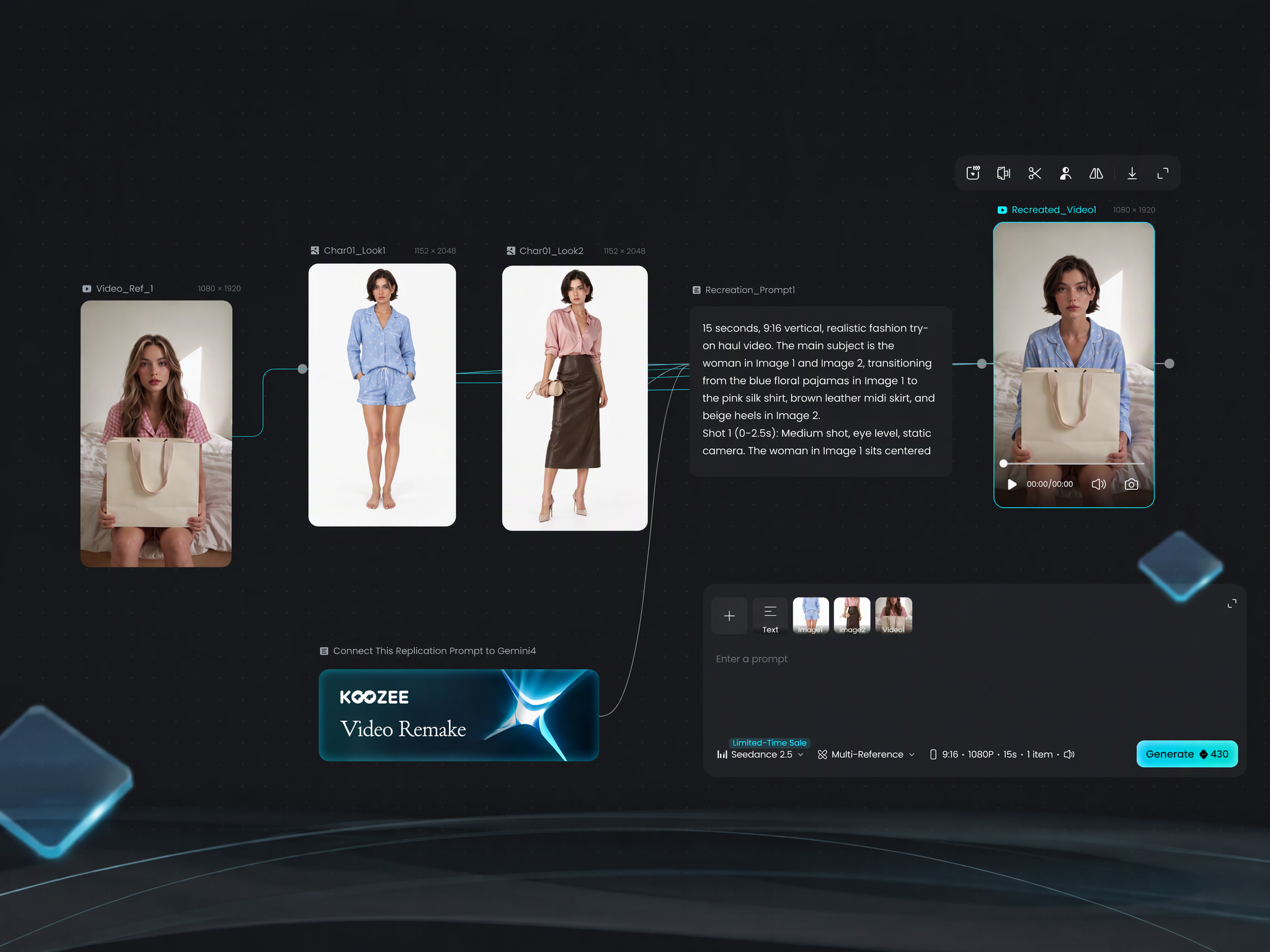
Shape Every Step in Freeform Canvas
For apparel visuals that need more creative control, Koozee’s Freeform Canvas lets teams combine steps and, when useful, choose AI models or refine prompts. They can test different directions and fine-tune the result in one workspace.
From Content Creation to Apparel Marketing
Koozee creates campaign posters and HD fashion videos. Its Replicate Video feature can use trending videos as references to showcase your own apparel in a similar style. Bitstudio generates video too; Koozee offers more ways to make promotional assets across new styles.
Koozee vs. Bitstudio: Full Feature Comparison
A complete side-by-side look at what each platform offers for apparel sellers.
| Comparison Criteria | KOOZEE | Bitstudio | |
|---|---|---|---|
| Core Features | Flat Lay | ||
| Ghost Mannequin | |||
| Pattern Extraction | |||
| Pattern Swap | |||
| AI Scene Replacement | |||
| Footwear Try-On & Display | |||
| Virtual Try-On | |||
| Full Outfit Generation | |||
| Multiple Clothing Categories | |||
| Accessory Processing | |||
| Kidswear | |||
| Lingerie & Swimwear Try-On | |||
| Specified Person + Specified Garment | |||
| AI Model Swap | |||
| AI Face Swap | |||
| AI Pose Control | |||
| Multiple Model Options | |||
| Gender Selection | |||
| Skin Tone Selection | |||
| Body Type Selection | |||
| Age Group Selection | |||
| AI Fashion Poster Generator | |||
| Apparel Rendering | |||
| Footwear Rendering | |||
| AI Image Enhancer | |||
| AI Background Remover | |||
| AI Watermark Remover | |||
| Multi-Size Export | |||
| AI Video Generation | |||
| AI Video Enhancement | |||
| Multiple AI Models | |||
| AI Model Type | GPT Image 2 / 2.5 Sunburst; Nano Banana Pro; Seedream 5.0 Pro; Seedance 2.0 / 2.5; Kling 4.0; Gemini 3.1 Pro / 4 Argon; GPT-6.1 Sol; Claude Opus 5.5 | Nano Banana Pro | |
| Productivity & Workflow | Web-Based Access | ||
| Requires Registration for Trial | |||
| No Installation Required | |||
| Quick Create | |||
| Templates & Presets | |||
| Freeform Canvas | |||
| Custom Multi-Step Workflow | |||
| Reusable Workflows | |||
| Multi-Model Workflow | |||
| Task History | |||
| Batch Upload | |||
| Batch Generation | |||
| Batch Download | |||
| Task Progress Tracking | |||
| Team Collaboration | |||
| Technical Support | Web-Based Product | ||
| API Availability | |||
| MCP / AI Agent Access | ✅ (MCP) | ||
| Mobile App Available | |||
| Shopify Integration | |||
| Pricing & Plans | Free Version | ||
| Free Trial Available | |||
| Monthly Subscription Plan | $22.90/month (Pro) | $15 (Basic)
$39 (Pro)
$99 (Ultra) | |
| Annual Subscription Plan | $16.66/month (Pro, billed annually; save 30%) | $180 (Basic)
$468 (Pro)
$1188 (Ultra) | |
| Price Per Image (Nano Banana Pro) | Trial / Bonus Credits: 2K 10 credits/image, 4K 20 credits/image; Pro: 2K 5 credits/image, 4K 10 credits/image | $0.22 | |
| Video Generation Price Per Second | Trial / Bonus Credits: 10 credits/second; Pro: 5 credits/second | $0.50 | |
| Enterprise Pricing Available | |||
| Custom Pricing Available | |||
| Commercial Capabilities | Image Download | ||
| HD Export | |||
| Watermark-Free Export | |||
| Multiple Export Formats | |||
| Transparent Background Export | |||
| Optimized for Main Product Images | |||
| Optimized for Product Detail Page (PDP) Assets | |||
| Optimized for Ad Creative Assets | |||
| Optimized for Social Media Creative Assets | |||
When to Choose Koozee vs. Bitstudio
The right tool depends on what you sell and what you need to create.
Choose Koozee if you…
- Need apparel product photos, AI try-ons, posters, and fashion videos for launches and campaigns
- Require specialized tools covering 3D garment visuals, pattern work, and Apparel Rendering
- Want more room in Freeform Canvas to create in your brand's style
- Want to adapt trending or existing video styles with Replicate Video to showcase your own apparel
- Need MCP to connect Koozee to AI agents
- Run a Shopify store and want to create apparel images and videos for new listings faster
Choose Bitstudio if you...
- AI model photos cover most of your needs
- Need API integration to connect image or video generation to your own system
- Want a Shopify virtual fitting room for shoppers to try on clothing online
- Prefer built-in editing tools like face swap, pose changes, and image editing to refine model photos after generation
- Focus mainly on apparel display and do not currently need extensive marketing assets or complex garment processing
Check What You Can Do with Koozee
Koozee vs. Bitstudio
What is Koozee?
Is Koozee a good alternative to Bitstudio AI?
Yes. Both platforms support AI try-ons and model images. Koozee also covers garment detail work, marketing content, and Freeform Canvas, with MCP access for AI agents. Bitstudio suits merchants whose priority is shopper-facing virtual try-ons.
Which platform is better for Shopify sellers?
For Shopify sellers preparing new listing visuals, Koozee uses existing clothing photos to create model images, apparel product photos, and videos. Sellers review the results before publishing them to the matching listing. Bitstudio's virtual fitting room suits stores that want shoppers to try on clothing on the product page.
Which platform is better for apparel marketing content?
Koozee fits apparel teams that regularly create product page assets, posters, and fashion videos for ads, social media, and new launches. Its Replicate Video feature helps you adapt trending videos to showcase your own clothing. Bitstudio remains a fit when AI try-ons and model images are the main focus.
What Is the Difference Between Quick Create and Freeform Canvas?
Use Quick Create when you know which apparel asset you need and want to make it directly. Choose Freeform Canvas when you want to explore options and refine the look step by step.
More Koozee Comparisons

Botika AI vs. Koozee: More Than AI Model Photos


FASHN vs. Koozee: AI Try-On Engine or Apparel Business Platform?

Pebblely vs Koozee: Beyond AI Product Backgrounds?

Koozee vs. Photoroom: Which AI Is Better for Apparel Content?

Koozee vs. PicCopilot: Which AI Visual Platform is Better for Apparel Sellers?

Koozee vs. remove.bg: Which AI Tool Fits Your Apparel Workflow?