Shopify Conversion Rate Optimization Best Practices for Apparel Sellers


Whether you’re just starting out on Shopify or you’ve been running a store for years, Shopify conversion rate optimization (CRO) is the key to unlocking more revenue from the traffic you already have. In this article, we will walk through 11 Shopify conversion rate optimization best practices that work specifically for apparel sellers — from product visuals and sizing confidence to checkout speed and post-purchase experience. Each one draws on real data, current Shopify capabilities, and the unique needs of fashion e-commerce.
Key Takeaways
Conversion benchmark: A good Shopify conversion rate for apparel stores is about 2.0%–3.1%; top performers exceed 4.7%.
Biggest lever for apparel: Product visuals — high-quality images and videos can lift conversion by up to 40%, and AR try-on experiences can drive up to 200% increase.
Mobile is non-negotiable: Nearly 80% of fashion retail traffic comes from mobile; if your store isn't mobile-first, you're leaving money on the table.
Sizing kills conversions: 56% of apparel returns stem from fit and sizing issues; detailed size guides and fit notes reduce hesitation and returns.
Checkout friction is a silent revenue leak: 70% of carts are abandoned; Shop Pay, guest checkout, and transparent pricing directly recover lost sales.
Bottom line: Apparel CRO is about closing the "touch and try" gap — every tactic should help a customer feel confident buying clothing they can't physically experience.
What Is a Good Conversion Rate on Shopify?
A good Shopify conversion rate is widely considered 2.0% and higher. Littledata report shows that the platform-wide average conversion rate hovers around 1.4%, but that number includes inactive stores, test stores, and shops that barely drive traffic. Among active, well-run stores, the competitive benchmark is higher:
| Performance Tier | Conversion Rate |
| Platform average (all stores) | 1.40% |
| Healthy apparel store | 2.0%–3.1% |
| Top 20% of Shopify stores | 3.2%+ |
| Top 10% of Shopify stores | 4.7%+ |
Conversion rates also vary significantly by industry, and a critical nuance is that mobile conversion rates are 30–40% lower than desktop. Even though mobile users drive the majority of traffic for most apparel stores, the conversion gap means every improvement to the mobile shopping experience has an outsized impact.
Why Shopify CRO Matters for Apparel Sellers
Apparel e-commerce has a fundamental disadvantage compared to other categories: the customer can't touch, feel, or try on the product. This imagination gap is why clothing has historically been one of the hardest categories to sell online.
For Shopify apparel sellers, this means conversion rate optimization isn't just about tweaking button colors or adding urgency pop-ups. It's about systematically closing the gap between what a customer sees on screen and what they'd experience in a fitting room.
The apparel sellers are likely to win if they:
Make products look and feel real through exceptional visuals.
Remove sizing doubt with precise guides and fit information.
Build trust quickly with reviews, UGC, and transparent policies.
Reduce checkout friction so confident buyers don't second-guess themselves.
Optimize for mobile users where most fashion browsing happens.
Knowing what a top Shopify store requires, let's dive into the 11 best practices for improving your Shopify conversion rate in 2026.
1. Make Product Images Your Top Conversion Asset
💡 Why it matters: When customers can't physically interact with clothing, images are the closest thing to a fitting room experience. Stores with professional-quality product photos see up to 94% higher conversion rates than those with low-quality images.
For apparel specifically, Shopify's clothing product photo strategy needs to go beyond "one photo per product." Here's what a conversion-optimized image set looks like:
Lead with a clean, white-background front shot: This is the image customers see first in collection pages and search results. It should be crisp, well-lit, and show the full garment.
Follow with a sequence of 6–8 images: Cutout view → lifestyle/on-model shot → back view → detail close-ups (fabric, stitching, zippers) → alternate color/variant → scale/size reference.
Include lifestyle and context photos: Show the clothing on a real person in a setting the customer relates to. This helps them visualize how the item fits into their own life.
Enable high-resolution zoom: Customers want to inspect fabric texture, seam quality, and finish details before committing.
📌 Apparel-specific tip: For clothing that fits differently on different body types (dresses, fitted tops, pants), include multiple model shots showing the garment on at least two body shapes. This single addition can reduce return rates and increase purchase confidence.
2. Add Product Videos and Virtual Try-On Experiences
Static images are the baseline. Video and interactive experiences are what separate high-converting apparel stores from average ones.
Product videos let customers see how fabric moves, how a garment drapes, and what it looks like from multiple angles, all in seconds. A short 15–30 second video showing a model walking, turning, and wearing the item in a natural setting can increase conversion by up to 40% compared to images alone.
Virtual try-on and AI try-on tools take this further. Shopify has reported a 200% increase in conversions when merchants implement AR-powered try-on experiences. For apparel sellers, AI try-on technology — where customers upload a photo or see clothing rendered on diverse model types — addresses the single biggest barrier to buying clothing online: "How will this look on me?"
The key is to make these visual assets easy to produce. Traditional product videos and model photoshoots are expensive and logistically heavy — especially for sellers with frequent new arrivals, many SKUs, or niche categories like lingerie and swimwear. This is where AI-powered visual production tools are changing the game for apparel sellers (more on this in the bonus section below).
3. Write Product Descriptions That Sell the Experience
Most apparel product descriptions read like inventory lists: "Cotton blend, round neck, available in three colors." That's not selling — it's cataloging.
High-converting product descriptions do three things:
Describe how it feels, not just what it is. Instead of "100% organic cotton," try "Lightweight organic cotton that breathes on warm days and softens with every wash."
Address the unspoken question every apparel buyer has: "When and where would I wear this?" A sentence like "Wear it to brunch with white sneakers, or dress it up with heeled sandals for an evening out" helps customers visualize the item in their life.
Use bullet points for scannable details, prose for persuasion. Put sizing, material, and care info in bullets. Put the benefit-driven description in 2–3 short paragraphs above the fold.
⚠️ Common mistake: Hiding the product description below a fold or behind a "Read more" tab. Customers should see the core description without scrolling. Reserve expandable sections for detailed specs and care instructions.
4. Build a Mobile-First Shopping Experience
Nearly 80% of fashion retail traffic comes from mobile devices, and 66% of global online orders happen on mobile. Yet mobile conversion rates remain 30–40% lower than desktop. This gap is both a problem and an opportunity.
For apparel stores, a mobile-first experience means:
Thumb-friendly navigation: Sticky "Add to Cart" buttons, filters for size and color that are easy to tap, and a simplified menu structure.
Fast-loading product pages: Compress images, minimize pop-ups, remove unused Shopify apps, and use a lightweight theme like Dawn or Impulse.
Streamlined mobile galleries: Use swipeable image carousels with large tap targets. Make sure zoom works smoothly with pinch gestures.
One-tap checkout options: Shop Pay, Apple Pay, and Google Pay reduce the friction of typing payment details on a small screen.
Test your store by browsing it entirely on your phone. Solve the core problem: Can you find a product, select a size, and check it out in under two minutes? If not, there's conversion leakage to fix.
5. Simplify Your Checkout Process
Baymard’s cart abandonment research consistently shows that a large share of carts are abandoned, with extra costs, slow delivery, forced account creation, and complicated checkout among the major friction points.
The most impactful checkout optimizations for Shopify apparel stores:
Enable Shop Pay: Shopify's accelerated checkout remembers customer details and cuts checkout time to seconds. Stores using Shop Pay see up to 50% higher checkout conversion than those that don't.
Offer guest checkout: Don't gate purchases behind account creation. Let customers buy first, then invite them to create an account post-purchase.
Be transparent about costs early: Show shipping costs, estimated delivery dates, and return policies on the product page or cart — not just at the final step of checkout. Unexpected fees are the #1 reason for cart abandonment.
Use Shopify's one-page checkout (Shopify Plus): If you're on Plus, the single-page checkout layout reduces steps and keeps customers focused.
💡 Pro tip: Add a sticky cart summary on your mobile so customers can always see their total, item count, and a checkout button — no scrolling required.
6. Build Trust with Reviews, UGC, and Social Proof
Apparel purchases are high-uncertainty decisions. Customers trust other customers more than they trust brand copy. Social proof elements that move the needle for clothing stores:
Customer reviews with photos: Reviews that include customer-submitted photos are worth far more than text-only reviews. They show real people wearing your products in real settings.
Star ratings in collection pages: Display aggregate ratings on product cards so customers see social proof before they even click into a product.
Review volume and recency: 50+ recent reviews signal a healthy, active product. If a product has only 2 reviews from 2023, that hurts more than having no reviews at all.
User-generated content (UGC) galleries: Embed Instagram or TikTok posts from real customers wearing your products. This doubles as social proof and style inspiration.
📌 Note on review rating psychology: A perfect 5.0 average can look suspicious, especially when there's a high sales volume. A credible range (4.5–4.9) with a mix of praise and minor criticism actually builds more trust than flawless scores.
7. Improve Store Speed and Technical Performance
Shopify store speed directly impacts conversion: a one-second delay in page load time can reduce conversions by 7%. For mobile shoppers on slower connections, the impact is even greater.
Quick wins for Shopify store performance:
Compress images: Use WebP format and keep files under 200 KB. Shopify's built-in image CDN helps, but uploading already-compressed images is better.
Remove unused apps: Every Shopify app adds JavaScript and potential slowdown. Audit installed apps quarterly and uninstall anything you're not actively using.
Use a fast, lightweight theme: Themes like Dawn (Shopify's reference theme) are built for speed. Feature-heavy themes with animations and complex layouts often hurt performance.
Limit homepage content: Don't load 50 products on the homepage. Use lazy loading for content below the fold.
Enable browser caching and use a CDN: Shopify handles most of this automatically, but check that you're not accidentally overriding cache settings.
You can use Shopify's built-in speed report (Online Store → Themes → Speed) and Google PageSpeed Insights to identify specific bottlenecks.
8. Use Strategic Calls to Action and Smart Urgency
A call to action should tell the customer exactly what will happen when they click — and why they should do it now. Effective Shopify CTAs should be more specific than a generic “Buy Now”.
"Add to Bag — Free Shipping & Returns" reduces perceived risk right at the point of action.
"Only 3 Left in Size M" uses real inventory data to create genuine urgency — not fake countdown timers.
"Complete the Look" sections below the fold encourage multi-item purchases with a single click.
⚠️ Warning on fake urgency: Countdown timers that reset on refresh and "Only 2 left!" messages that never change erode trust. Use real inventory data and genuine limited-time offers. Customers value trust more than the order push.
9. Create Detailed Size Guides That Eliminate Doubt
Fit and sizing are among the biggest drivers of apparel returns. Research on fashion ecommerce repeatedly identifies size and fit uncertainty as a major challenge for online clothing purchases. For online-only apparel brands, sizing uncertainty can create costly returns and exchanges.
A conversion-optimized size guide does more than list S/M/L/XL. It's better to:
Use actual body measurements (inches and centimeters): Bust, waist, hip, and length in real numbers — not generic size charts pulled from a template.
Add fit notes per product: "Runs slightly large — we recommend sizing down" or "Designed for a relaxed, oversized fit."
Include model reference info: "Model is 5'8", wearing size S, typically wears US 4–6."
Add a "Find Your Size" tool: Apps like Kiwi Sizing or Fit Finder let customers input their measurements and get a personalized size recommendation. Fit tools can help reduce uncertainty, but results vary by category, traffic, and data quality.
Place the size guide prominently near the size selection dropdown, not buried in a footer link.
10. Leverage Personalization and AI Recommendations
Personalization turns a generic store into a curated shopping experience. Shopify's ecosystem makes this accessible even for smaller brands. Effective personalization tactics for Shopify apparel sellers:
"You might also like" and "Complete the look": Use Shopify's product recommendation API or apps like Wiser to cross-sell relevant items on product pages and in the cart.
Recently viewed items: Let customers pick up where they left off — especially useful for clothing, where buyers often browse across multiple sessions.
Behavior-triggered emails: Abandoned cart emails recover 3–5% of lost sales on average. Browse-abandonment emails ("Still thinking about the linen dress?") are less common but often more effective for apparel.
Geo-personalization: Show seasonally appropriate products based on the visitor's location, or offer free shipping thresholds in the local currency.
Start simple: add relevant product recommendations, recently viewed items, and abandoned-cart flows before investing in advanced personalization.
11. A/B Test Everything — Starting with Your Product Pages
Shopify CRO isn't a one-time project. It's a cycle of testing, learning, and improving. Start with the pages that matter most: your product pages. These are where purchase decisions happen. Test one element at a time:
| Test Element | What to Try | Measure |
| Primary product image | Lifestyle shot vs. white-background cutout | Add-to-cart rate |
| Product description length | Short bullet format vs. 2–3 paragraph story | Time on page, conversion |
| CTA button text | "Add to Bag" vs. "Add to Cart" vs. "Buy Now" | Click-through to cart |
| Size guide placement | Near size selector vs. tab below description | Size selection rate, return rate |
| Price display | "Sale $49" vs. "Was $69, now $49" | Conversion rate |
Use Shopify Analytics to identify where customers drop off, and prioritize tests that target those points. Heatmap tools like Lucky Orange or Hotjar show you exactly where visitors click, scroll, and lose interest. If your store has low traffic, prioritize qualitative fixes first — speed, visuals, size guide clarity, checkout friction — before running small tests that will never reach a reliable sample size.
How to Choose the Right CRO Priorities for Your Shopify Store
Not every practice above will have an equal impact on your specific store. Here's a framework for prioritization:
If your store is new (under 6 months): Start with product visuals (Practice 1), size guides (Practice 9), and checkout optimization (Practice 5). Get the fundamentals right before chasing advanced tactics.
If your traffic is growing but conversion is flat: Focus on mobile experience (Practice 4), site speed (Practice 7), and A/B testing (Practice 11). The bottleneck is likely in the browsing-to-buying transition.
If you're in a high-consideration category (premium, luxury, or niche apparel): Invest in trust signals (Practice 6) and personalization (Practice 10). These customers need more reassurance before committing.
If you sell in a highly visual category (lingerie, swimwear, bodycon, fitted clothing): Prioritize product videos, try-on experiences, and multi-model photography (Practices 1 and 2). For these categories, visual confidence is everything.
Bonus Part: Improve Shopify Conversion Rate with Koozee AI Visual Production
If weak or limited product visuals are holding back your Shopify product pages, Koozee can help apparel sellers create more visual assets without scheduling a traditional shoot for every SKU. This is especially useful for frequent new arrivals, many SKU variations, and harder-to-shoot categories such as lingerie, swimwear, bodycon, and fitted apparel.
Koozee is an AI visual production platform built for apparel e-commerce. You can upload clothing images or connect your Shopify store, then generate listing-ready visuals such as model try-ons, product videos, lookbooks, and campaign assets from existing product photos.
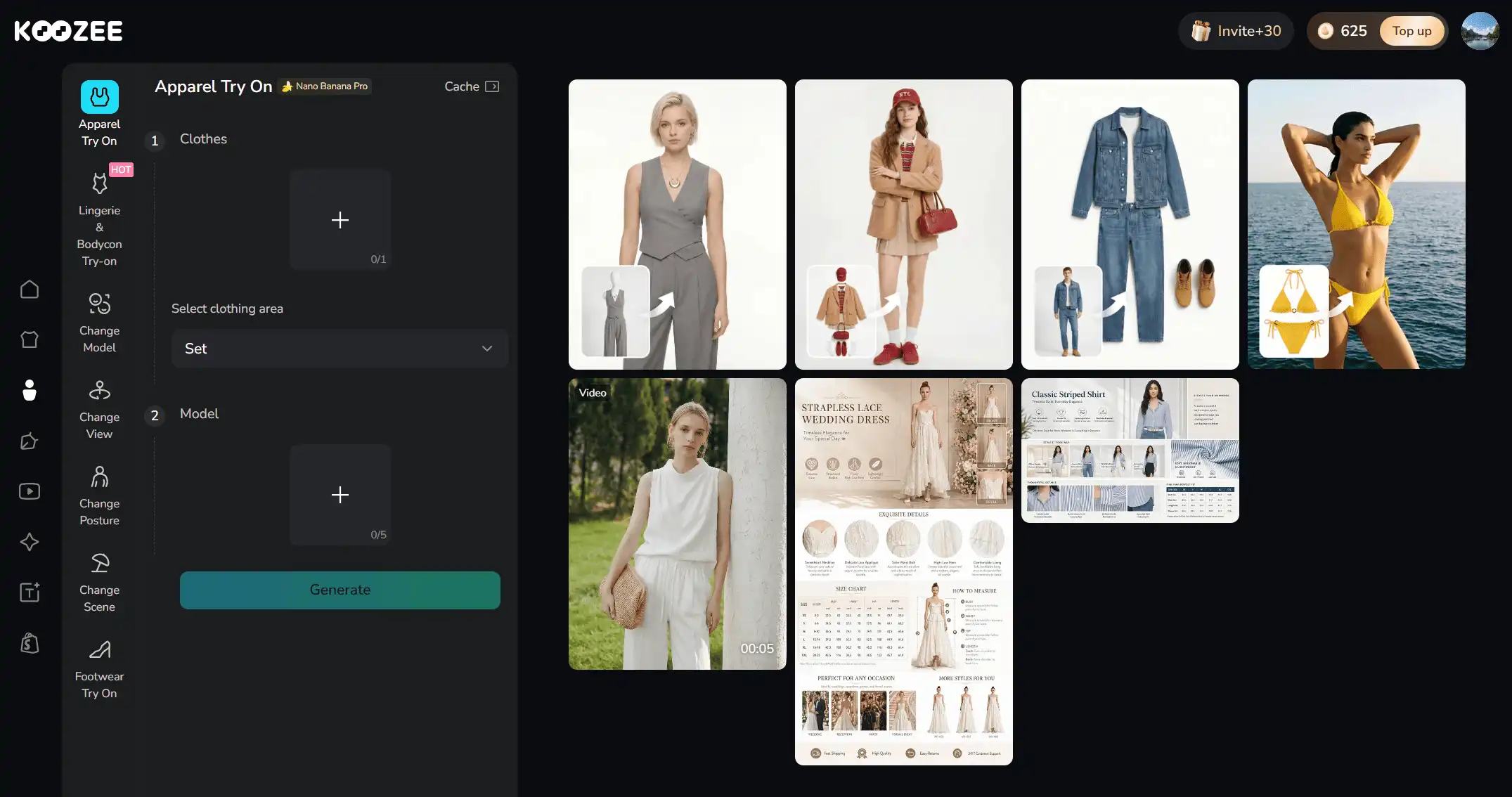
For Shopify apparel sellers focused on conversion, Koozee's most relevant capabilities include:
Apparel try-on and model variation: Generate on-model product images with diverse models, poses, and scenes — without arranging every shoot manually. This directly addresses the "how will this look on me?" question that holds back conversions.
Intimate apparel and fitted clothing try-on: Lingerie, swimwear, and bodycon sellers face especially high visual production costs and limited model availability. Koozee handles these categories while keeping the focus on product presentation.
Product videos and dynamic lookbooks: Turn static clothing images into short product videos, viral-style clips, and lookbook content — the kind of dynamic visuals that increase conversion by up to 40%.
Shopify product workspace: Connect your Shopify store, choose a product, reuse existing product images, generate new visuals, preview results, and manually publish approved assets back to Shopify. This reduces the download, rename, edit, and re-upload workflow.
Koozee does not replace CRO strategy, but it can remove one of the biggest operational blockers to stronger product pages: creating professional, conversion-oriented visuals at the speed apparel e-commerce requires.
Best for: Shopify apparel sellers who need more product visuals, especially in categories where traditional photoshoots are expensive, slow, or difficult to scale.
Conclusion: Small Changes, Compound Results
Shopify conversion rate optimization isn't about finding one magic tactic that doubles your sales overnight. It's about stacking small, compounding improvements across the entire buying journey — from the moment a customer lands on a product page to the second they complete checkout. The 11 practices above all support one of three goals: close the imagination gap, reduce sizing doubt, or remove checkout friction.
The apparel brands that win on Shopify in 2026 may not be the ones with the biggest ad budgets. They can be the ones that turn more of the traffic they already have into customers — by making every visit feel like a fitting room experience, not a gamble.
FAQs: Shopify Conversion Rate Optimization
What is a good conversion rate on Shopify?
A competitive Shopify conversion rate is 2.0%–3.1% for active, well-run stores. The top 10% of Shopify stores convert at 4.7% or higher. For apparel specifically, the typical range is 2.0%–3.1%. If your store is below 2%, there's meaningful room for optimization.
Why is my Shopify store not converting?
The most common reasons for low conversion in apparel stores are: poor product images, missing or vague size guides, slow page load on mobile, unexpected shipping costs at checkout, and lack of customer reviews or social proof. Start by auditing these five areas before pursuing more advanced tactics.
How do I improve my Shopify conversion rate fast?
Focus on the biggest friction first: speed up your store, use stronger product photos/videos, add clear CTAs, show reviews, and simplify checkout. Then run one A/B test at a time. For apparel, AI visuals can help quickly create your clothing photos or videos.
Does mobile optimization really matter for conversion rate?
Yes — mobile optimization matters a lot because mobile traffic is often the majority, yet mobile conversion rates usually lag behind desktop, so small UX fixes can unlock meaningful gains. Improving speed, navigation, forms, and checkout is one of the fastest ways to reduce mobile drop-off on Shopify.
How do product images affect my Shopify conversion rate?
Product images, especially in clothing stores, shape trust, clarity, and purchase confidence. Strong images, especially clear main shots, lifestyle visuals, and zoomable details, help shoppers understand the product faster and reduce hesitation.
Can AI tools really help with apparel conversion rates?
Yes — in two main ways. AI-powered try-on and visual production tools (like Koozee) help create high-quality product photos and videos that drive conversions, without the cost and timeline of traditional photoshoots. AI personalization tools help recommend relevant products and recover abandoned carts. Both categories have measurable conversion impact when implemented well.
How often should I A/B test my Shopify store?
Run at least one A/B test per month on a high-traffic product page. Test one element at a time (image, CTA, description format, price display) and let tests run until you reach statistical significance — usually 2–4 weeks, depending on traffic volume. Don't test too many elements simultaneously, or you won't know which change moved the needle.
You May Be Interested

Top 10 Virtual Try-on Apps for Shopify (2026)

E-commerce Image Localization: 4 Methods for Higher Conversion Rates

Amazon Product Photography for Clothing Sellers: 3 Methods 2026