How to Do Product Photography for Amazon: Clothing Sellers' Guide


For Amazon clothing sellers, product images aren't decoration. They're the closest thing a customer gets to touching the fabric, checking the fit, and seeing how the garment actually looks when worn. When a shopper can't try something on, the photos have to do all the convincing. The challenges are that Amazon has strict requirements, and models are expensive. More importantly, if the images don't match what arrives in the box, returns pile up fast.
How to do product photography for Amazon effectively? This guide covers three approaches to creating Amazon-ready product images for your Amazon fashion listing images: setting up your own DIY studio, hiring a professional Amazon photography service, and using AI-powered tools to generate product visuals. You'll also get Amazon's exact image requirements for apparel, the seven photo types every clothing listing needs, and a head-to-head cost comparison so you can decide what fits your brand and budget.
Key Takeaways
Amazon requires models for adult clothing: For many adult clothing categories, Amazon’s clothing image guidelines require the main image to show the product on a standing model against a pure white background. Always check the exact category and marketplace rules before uploading.
Three paths to listing-ready images: DIY photography (lowest cost, highest effort), professional Amazon photography services (consistent quality, higher per-SKU cost), and AI tools (fast, no logistics, growing quality).
Seven image types drive conversions: Main image, alternate angles, detail close-ups, lifestyle shots, size charts, infographics, and ghost mannequin/flat-lay — using all available slots consistently outperform listings with fewer images.
Bad images are expensive: Apparel return rates are often higher than many other ecommerce categories, and one of the important reasons is that the product looks different in person than it did in the photos.
Start with the main image: Nail the white-background, model-standing, 85%-fill requirement first — it's the image every shopper sees in search results — then build out supporting images based on your budget.
Amazon's Image Requirements for Clothing Products
Before you take a single photo or generate a single image, you need to know Amazon's rules. Getting flagged for non-compliance can lead to listing suppression.
1. Main Image Requirements (Non-Negotiable)
Amazon’s main image has the strictest compliance rules. Failing any of these will result in immediate listing suppression:
Pure white background: RGB 255, 255, 255. No off-white, no subtle gradient, no shadow bleeding into the background. Amazon's system checks this.
85% frame coverage: The product must fill 85% or more of the image frame. Use tight cropping so the garment dominates the visual space without being cut off.
Standing human models (Adults): Adult apparel main images generally need to show the garment on a standing human model, with the product clearly visible and the model not sitting, kneeling, leaning, or lying down. (Note: Images must not have visible mannequins, except for stockings or socks)
Flat-lay photography (Babies & Kids): Baby and children’s clothing follow stricter model-use rules. Amazon’s clothing guidelines prohibit modeling for children’s or baby undergarments, swimwear, leotards, and similar form-fitting items. Flat product images are often safer for these categories, but sellers should check the exact category rule before uploading.
No text, logos, or graphics: The main image must consist entirely of the product being sold. Do not include watermarks, borders, inset images, color blocks, or promotional text. Save infographics, brand logos, and sizing charts for your secondary image slots.
High-resolution sizing: Amazon requires images to be at least 500px on the longest side, with a maximum of 10,000px. To enable zoom, use images that are at least 1,000px on the longest side; for apparel, 1,600px or higher is a practical target.
2. Technical Specifications for All Images
| Requirement | Specification |
| File format | JPEG (preferred), PNG, TIFF, non-animated GIF |
| Resolution | 1,000–10,000 px on longest side (1,600+ recommended) |
| Color space | sRGB or CMYK |
| File naming | Product identifier + variation code (e.g., B00123.MAIN.jpg) |
3. Alternate Image Guidelines
Once the main image is compliant, you have more creative freedom with the additional image slots (up to 7–9 depending on category):
Lifestyle and in-context shots are encouraged.
Infographics showing materials, dimensions, and features are allowed.
Close-up detail images are recommended for fabric and construction.
Size charts are expected for apparel listings.
⚠️ Warning: Even in alternate images, avoid misleading claims, competitor comparisons, or promotional language like "best seller" or "guaranteed." Amazon's moderation team reviews all images.
4. 7 Types of Product Photos Every Amazon Clothing Listing Needs
Amazon gives you image slots — and successful apparel sellers use every one of them. Here's the full lineup, in order of priority:
| Photo Type | Visual Setup | Key Features & Strategic Purpose |
| 1. Main Image | Pure white background; standing model (adults) or flat-lay (kids). | Your search result thumbnail that drives initial clicks; garment must fill 85%+ of the frame. |
| 2. Alternate Angles | Front, back, side, and three-quarter perspectives. | Shows full garment drape and neckline/back details; include at least 3 to 4 variations. |
| 3. Details & Close-Ups | Macro shots zoomed in on specific garment sections. | Highlights fabric weave, stitching quality, buttons, and zippers to build buyer trust. |
| 4. Lifestyle | Garment worn in a real-world environment (home, outdoors, social). | Helps shoppers visualize wearing the item in real life; consistently boosts conversion rates. |
| 5. Size Chart | Clean, easy-to-scan graphic mapping sizes to exact dimensions. | Includes chest, waist, and length in both metric and imperial; essential for reducing sizing returns. |
| 6. Infographic | Clean visual design combining images with minimal text overlays. | Quickly communicates core selling points like fabric stretch, care instructions, and specific fit notes. |
| 7. Ghost Mannequin / Flat-Lay | 3D hollow-man effect (interior neck visible) or top-down flat view. | Demonstrates garment structure and interior tailoring without a model; flat-lays are ideal for kids' items and accessories. |
📌 Note: If you're selling in both the U.S. and European Amazon marketplaces, check local image requirements — some EU marketplaces have additional guidelines around model imagery and product representation.
How to Do Product Photography for Amazon
To create qualified and attractive photos for Amazon clothing listings, you can try 3 proven methods according to your real needs and budget.
Method 1: DIY Product Photography — Build Your Own Apparel Photo Studio
If you're launching with a small catalog or testing a new product line, doing photography yourself keeps costs low and gives you full creative control. The tradeoff is time — expect a learning curve, especially with lighting fabric and directing models.
Step 1: Gather Your Equipment
Camera: A modern smartphone (iPhone 14 or newer, recent Galaxy/Pixel) can produce Amazon-ready images when paired with good lighting. For more control, an entry-level mirrorless camera (Sony a6000 series, Canon EOS M50) plus a 50mm lens is the sweet spot.
Tripod: Essential for consistency. A $30–50 tripod eliminates camera shake and keeps framing uniform across SKUs.
Lighting: Two softbox lights or LED panels with adjustable brightness and color temperature (5,000–5,500K for daylight) are the minimum.
Backdrop: A seamless white paper roll (53" or wider) plus a stand is the standard setup.
Steamer or iron: Wrinkled clothing photographs terribly. Invest in a garment steamer — it's faster than ironing and safer on delicate fabrics.
Step 2: Set Up Your Shooting Space
Position your backdrop 3–5 feet behind where the model or mannequin will stand. Place one light on each side at roughly chest height, angled 45 degrees inward. The goal is even, diffused light with no harsh shadows behind the subject.
For flat-lay photography (used for children's clothing and alternate images), position your foam board on the floor near a large window. Natural window light plus one fill light produces clean, shadow-free flat-lays.
Step 3: Work with Models (Even on a Budget)
For adult apparel, you need a human model. Options ranked by cost:
Friends or family: Free, but requires clear direction.
Local modeling groups on Facebook: Often $50–150 for a half-day shoot.
Photography students building portfolios: May work for trade or low rates.
Professional models through agencies: $200–500+ per session.
💡 Pro tip: Shoot multiple SKUs in one session with the same model to maximize your per-hour value. Prep all garments in advance — steamed, de-tagged, and organized by outfit — so the model can change quickly.
Step 4: Post-Processing and Editing
Once shooting is done, you'll need to edit:
Background removal: Achieve the pure white (255,255,255) background required for main images.
Color correction: Match the image colors to the actual garment as closely as possible.
Cropping and resizing: Crop to 85%+ fill for the main image; resize to at least 1,600px on the longest side.
File export: JPEG at 90–100% quality.
Best for: Sellers with fewer than 20 SKUs, those with photography experience (or willingness to learn), and anyone prioritizing the lowest upfront cost per listing.
Method 2: Hire an Amazon Photography Service
When your catalog grows or you need consistent, professional-grade images without the learning curve, outsourcing to a specialized Amazon photography service makes sense.
What Amazon Photography Services Offer
Guaranteed compliance with Amazon's main image rules.
Model sourcing and direction for apparel.
Multiple image types per SKU.
Infographic design for alternate images.
Post-processing, retouching, and color correction.
Amazon-optimized file naming and format delivery.
Typical Pricing for Apparel
Amazon's photography services are priced per image or per SKU. For clothing specifically, expect:
| Service Level | Price Range | What's Included |
| Basic (main image only) | $25–60/image | White background, model or mannequin, one angle |
| Standard (3–5 images) | $75–200/SKU | Main + alternate angles, basic retouching |
| Premium (7+ images) | $250–600/SKU | Full image set including lifestyle, infographics, detail shots, advanced retouching |
📌 Note: Prices vary significantly by location. U.S.-based services cost more but may communicate more easily. Services in other countries (commonly in India, the Philippines, Eastern Europe) often charge 30–50% less with comparable quality.
How to Evaluate an Amazon Photography Service for Apparel
When vetting an Amazon photography service, look specifically for:
Apparel experience in their portfolio: Look for examples of garments similar to yours — same category, same fabric types.
Amazon compliance guarantee: Reputable services will explicitly state that their images meet Amazon's requirements and will re-shoot if rejected.
Model diversity: If your brand sells to diverse customers, make sure the service can provide models that reflect your audience.
Turnaround time: Typical is 5–14 business days from garment receipt to final images. Rush services may cost 50% more.
Revision policy: At least one round of edits should be included in the base price.
Best for: Established sellers launching new product lines. Brands where visual consistency is central to positioning. Sellers who want hands-off production without learning photography themselves.
Method 3: AI-Powered Product Image Creation — High Efficiency for Apparel Sellers
AI is becoming a practical option for parts of e-commerce visual production, especially for apparel sellers who need more image variations than traditional shoots can support. For clothing sellers specifically, AI tools can now generate model try-on images, ghost mannequin visuals, flat-lays, and lifestyle shots from existing product photos.
Koozee is an AI visual production platform built specifically for apparel e-commerce sellers. Rather than being a generic image generator, it's designed around the workflows that clothing sellers actually need — model try-ons, product images, apparel videos, and listing-ready assets.
How Koozee Works for Amazon Clothing Photography
Step 1: Go to Koozee's workspace and choose AI Model Virtual Try On.
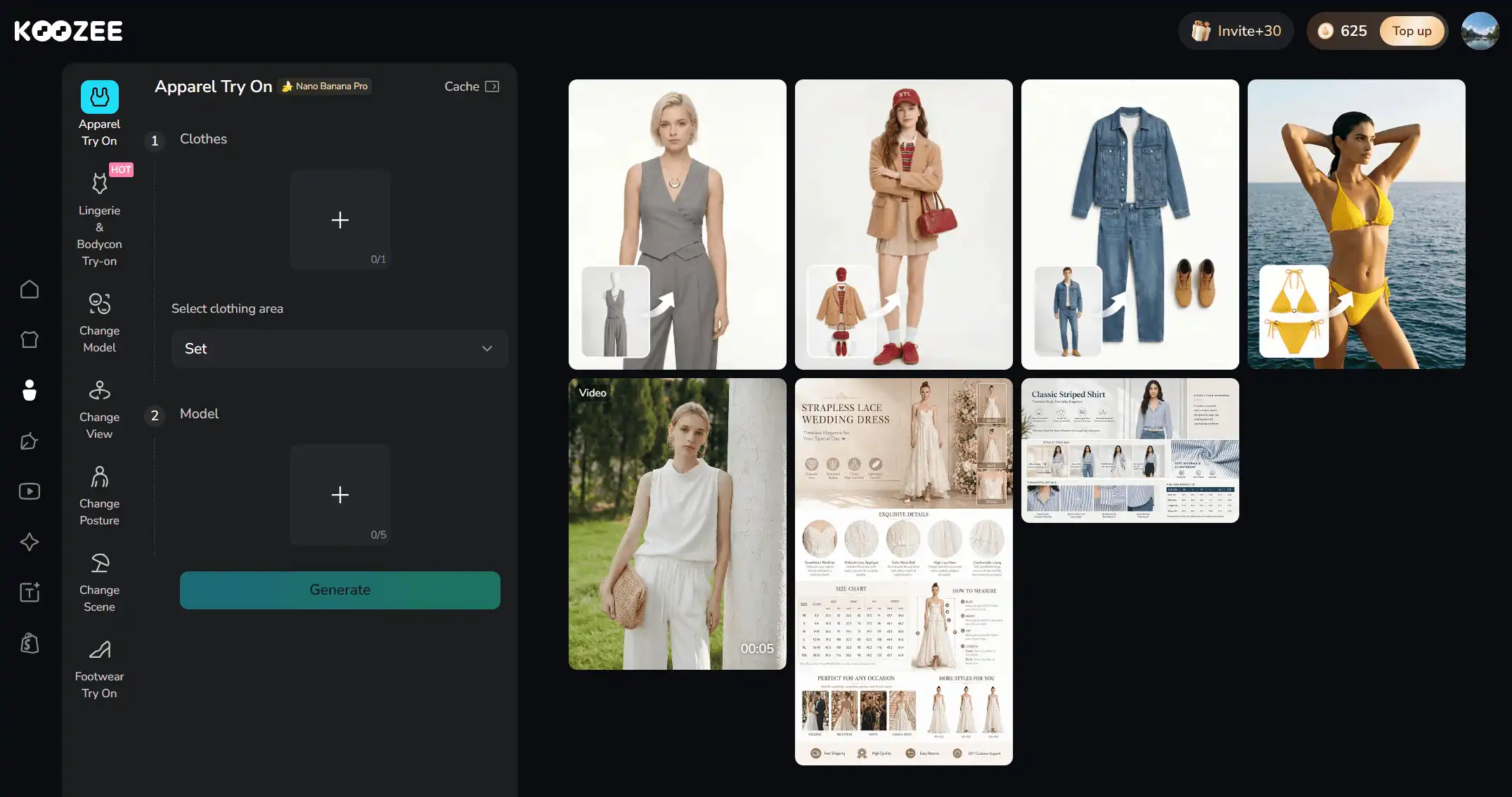
Step 2. Upload your clothing product image. Start with a clear photo of your garment — on a hanger, laid flat, or on a mannequin. The AI uses this as the source to understand the garment's shape, color, and details.
Step 3. Select model, scene, and pose preferences. You can upload 5 models to Koozee simultaneously and switch them when necessary.
Step 4. Generate and review. The AI produces multiple variations. Generate the images immediately. Don't forget to review for accuracy — particularly fabric drape, color fidelity, and garment structure.
Step 5. Download and upload to Amazon. Export images at Amazon-compliant resolutions (1,600px+) and upload directly to your listing.
>>Try Koozee with 30 free credits!
What AI Handles Well vs. What Still Needs Human Review
✅ Works well for: Standard garment types (t-shirts, dresses, jackets, jeans, sweaters, basic lingerie, swimwear), solid colors, simple patterns, and garments with clear structure.
⚠️ Review carefully for: Highly detailed lace, sheer fabrics, reflective materials, unusual garment constructions, and multi-layered outfits. AI is improving rapidly in these areas, but always inspect outputs before publishing.
Why AI-Powered Photography Matters to Amazon Clothing Sellers
The traditional model for apparel product photography — find models, book a studio, shoot, edit, deliver — hasn't changed much in decades. It still takes days to weeks and costs $30–150+ per professional image.
AI tools shift the equation: generate images in minutes, create dozens of variations with lower cost rather than per-image fees, and iterate without scheduling another shoot. For sellers managing frequent SKU updates, seasonal collections, or multiple marketplace requirements, this speed difference compounds quickly.
Best for: Apparel sellers who want to skip photoshoot logistics, need diverse model variations for different markets, sell in intimate or fitted apparel categories where model sourcing is difficult, or want to test new product visuals before committing to a full professional shoot.
💡 Pro tip: Even if you ultimately use professional photography for your hero images, AI tools work well for generating supplementary images — alternate angles, different model looks, and lifestyle variations that would be expensive to shoot traditionally. Many sellers use a hybrid approach: professional main image + AI-generated supporting images.
Comparison: DIY Photography vs. Professional Services vs. AI Tools
| Factor | DIY Photography | Professional Service | Koozee |
| Cost per SKU | $50–2000 (equipment, one-time) | $75–600 depending on image count and quality tier | Free credits; Paid credits scale with usage or $22.9/month |
| Turnaround time | 1–3 days (active work) | 5–14 business days | Seconds to minutes |
| Model variety | One model per shoot session | Depends on service's model roster | Multiple models, ages, ethnicities, body types |
| Scene/lifestyle options | Limited to available locations | Studio or on-location shoots available | AI-generated studio and lifestyle backgrounds |
| Amazon compliance | Must verify yourself | Usually guaranteed by the service | Review outputs for accuracy |
| Learning curve | High (Require photography experience) | None (service handles everything) | Low (upload → select → generate → review) |
| Best for | Small catalogs, hands-on sellers, lowest cash outlay | Premium brands, consistent quality at scale, hands-off approach | Fast iteration, multiple variations, difficult-to-shoot categories |
Common Amazon Apparel Photography Mistakes & How to Fix Them
1. Non-Compliant Main Images
Check your background RGB value in editing software — it must be exactly 255,255,255. Use background removal tools to guarantee compliance.
2. Poor Lighting That Hides Fabric Details
Use diffused lighting from at least two sources. For dark fabrics, increase exposure slightly and check that stitching and texture remain visible.
3. Color Inaccuracy
Use a gray card (under $15) to set accurate white balance during shooting. In post-processing, compare the image side-by-side with the physical garment under daylight conditions.
4. Model Poses That Obscure the Garment
Direct models to stand straight with arms relaxed at their sides for main images. Use lifestyle shots for more natural, posed looks — but always include at least one clean, unobstructed view.
5. Not Using All Available Image Slots
Use as many relevant image slots as you can. Do not add low-quality filler images just to fill slots.
6. Inconsistent Styling Across SKUs
Choose one visual approach (DIY, professional, AI-generated) and apply it consistently. If you use AI for some SKUs and pro photography for others, make sure the editing style — color grading, brightness, framing — matches.
Beyond Traditional Photography: What Clothing Sellers Actually Need
When Amazon apparel sellers search for photography solutions, they aren’t just trying to rent studios or book models—they simply want high-converting, compliant images that drive sales. In the fast-paced reality of Amazon product photography, you can use DIY product photography, hire an Amazon photography service, or AI-powered product photo creation tools like Koozee to improve your Amazon store listings.
Ready to streamline Amazon apparel visual production? Try Koozee with one garment photo and create model try-on visuals, secondary listing images, and apparel video assets that you can review before publishing.
FAQs: Amazon Product Photography
Do I need a professional camera for Amazon product photography?
Not always. Modern smartphones can also produce images that meet Amazon's resolution requirements when paired with good lighting. The lighting matters more than the camera — a well-lit smartphone photo outperforms a poorly lit DSLR shot every time.
Can I use my iPhone to take product photos for Amazon?
Yes, as long as the final images meet Amazon's resolution requirement (1,000+ pixels on the longest side, 1,600+ recommended) and the main image has a pure white background. Use a tripod and natural or diffused artificial light for best results.
How much does Amazon product photography cost for clothing?
It ranges from nearly free (DIY with a smartphone) to $600+ per SKU (full-service professional photography with multiple models and lifestyle shoots). Most small-to-medium clothing sellers spend $30–150 per SKU using a mix of approaches. AI tools like Koozee offer an emerging middle ground — generating images for the cost of platform credits rather than per-image fees.
What's the best background for Amazon clothing product photos?
For the main image, a pure white background (RGB 255,255,255) is required — no exceptions. For alternate images, lifestyle backgrounds that show the garment in context are recommended, but the white-background requirement only applies to the main image.
Can AI-generated product images be used on Amazon?
Yes, as long as the images accurately represent the product and meet all standard image requirements. Amazon does not currently prohibit AI-generated product images.
How many images should an Amazon clothing listing have?
Typically 7–9, depending on your category. At minimum, include: main image (model, white background), back view, side view, one detail close-up, and a size chart. Listings with 6+ images consistently outperform those with fewer. We recommend using every available slot rather than leaving an empty slot.
Do I really need a model for my Amazon clothing main image?
For adult apparel — yes. Amazon requires that adult clothing main images feature a standing human model. Children's clothing must be photographed flat. This is one of the most commonly missed requirements and a frequent reason for listing rejection. If sourcing models is a barrier, AI tools can generate model try-on images from your existing product photos.
You May Be Interested

How to Photograph Clothes: 3 Proven Methods for Sellers

How to Photograph Clothing Without Models: 6 Methods

6 Tips to Take Good Photos for Depop 2026
