AI Models for TikTok Shop: What They Are & How to Use in 2026


As TikTok becomes one of the most popular short-video platforms, TikTok Shop sellers are experiencing significant changes in showcasing their products. Many apparel sellers are starting to use AI-generated models to create product photos, try-on visuals, and short-form videos for TikTok Shop. By turning basic clothing product images into stunning model try-ons and viral product videos, you can produce more product visuals without organizing a new photoshoot for every SKU. In this guide, you'll learn three practical methods to use AI models for your TikTok Shop, plus platform rules, comparison tables, and answers to common questions.
Key Takeaways
AI models solve the speed/cost problem: AI-generated model photos and videos help reduce your time on producing TikTok Shop visuals without hiring photographers, booking studios, or sourcing models.
TikTok has built-in AI tools: TikTok Shop's native AI Photo Maker and AI Fashion Video Maker are free starting points, but they are limited to use in the US, UK, and EU.
Apparel sellers need specialized tools: Generic AI image generators can struggle with clothing details. Tools purpose-built for fashion e-commerce produce better on-model results with consistent fabric draping, fit, and texture.
TikTok requires AI disclosure: Any content generated or significantly altered by AI must be disclosed using TikTok's built-in AI-generated content label — non-compliance risks content removal.
Start using AI models for TikTok Shop: Test any AI tool for TikTok on 2–3 products first. Evaluate output quality against TikTok Shop listing standards before scaling to your full inventory.
What Are AI Models for TikTok Shop?
AI models for TikTok Shop are synthetically generated digital humans used to showcase clothing, accessories, and products in e-commerce videos and static images. Instead of hiring physical models, booking a studio, and coordinating a video editing team, apparel sellers can use AI tools to drape their garments seamlessly onto photorealistic virtual models. For clothing and apparel sellers, this typically means:
AI fashion models: Virtual models wear your products in lifestyle or studio settings.
AI try-on visuals: Your product image digitally fitted onto models with different poses, body types, and backgrounds.
AI product videos: Short video clips generated from still product images, often with model movement and scene changes.
AI avatar videos: AI-generated presenters or influencers demonstrating your products in shoppable video formats.
Why AI models for TikTok Shop are popular: TikTok Shop is a visual-first platform. The algorithm rewards frequent, high-quality video content, and listings with model-worn images consistently outperform flat-lay photos. But traditional visual production — photographers, models, studios, editors — does not scale for sellers managing dozens or hundreds of SKUs.
TikTok's AI Content Policies: What Sellers Need to Know
Content will not be restricted or penalized solely for using AI, provided it complies with TikTok's Community Guidelines and Shop policies. Here is exactly what you need to know:
Disclosure Requirements
TikTok requires creators to disclose content that is fully generated or significantly altered by AI, particularly when it includes synthetic people, voices, or realistic AI-generated visuals. Basic edits such as cropping, color correction, or noise reduction generally do not require disclosure. According to TikTok's AI-Generated Content Restrictions and Requirements.
⚠️ Warning: TikTok prohibits using AI to "mislead, deceive, or distort facts" or to "misrepresent products or identities." Do not use AI models to make your products look materially different from what the customer will receive. This applies to fit, fabric texture, color accuracy, and proportions.
Method 1: Use TikTok's Built-In AI Photo Maker
TikTok doesn't prohibit the use of AI in its shops, and it provides a built-in AI Photo Maker inside the Seller Center for US, UK, and EU sellers. It generates product images from existing photos. Additionally, sellers can create carousel-style shoppable images, lifestyle backgrounds, and enhanced product shots optimized for TikTok's listing format.
How to Generate AI Model Photos with TikTok AI Photo Maker
Step 1. Log in to TikTok Shop Seller Center and navigate to LIVE & video.
Step 2. Select Shoppable videos > AI photo maker.
Step 3. Choose your products and templates. You can add optional prompts to help AI better understand your needs.
Step 4. Generate AI models for TikTok Shop.
Step 5. Review and select generated images. Then apply AI-generated content disclosure — enable the AI label toggle before publishing.
Step 6. Download or publish directly to your listing.
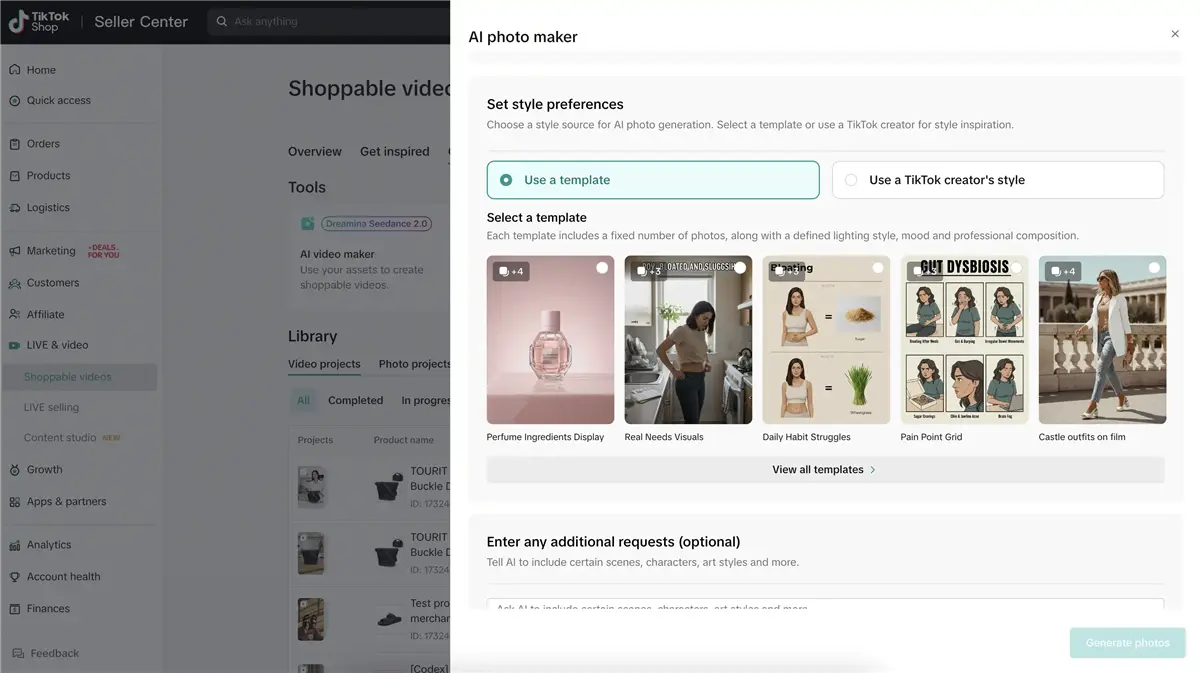
Best for: Sellers just starting with AI visuals who want a free, no-setup option for basic product images. It works well for simple product visuals, but apparel sellers may still need dedicated AI try-on tools for more realistic clothing presentation.
Method 2: Generate AI Model Videos for TikTok Shop
In addition to the AI Photo Maker, TikTok also provides an AI Fashion Video Maker that allows US sellers to create, review, and post shoppable videos faster with upgraded AI quality. You can check the detailed video types below:
Types of AI Model Videos
| Video Type | Description | Best Use Case |
| AI Fashion Video | Product shown on a virtual model with outfit transitions and scene changes | TikTok Shop listing videos, product showcases |
| AI Try-On Video | Virtual model turns or walks to show the garment from multiple angles | Clothing fit demonstrations, detail-focused content |
| AI Avatar Video | AI-generated presenter or influencer talks about the product | Explainer content, testimonials, feature walkthroughs |
| Viral Clone Video | Your product inserted into a proven viral video format or template | Trend-jacking, reaching new audiences fast |
How to Generate AI Model Videos with TikTok AI Video Maker
Step 1. Log into TikTok Shop Seller Center and choose Shoppable Videos.
Step 2. Select the Create Content option and click the AI video maker tool.
Step 3. Add your product and upload related materials, including product images or video clips.
Step 4. Add some prompts to help AI better understand your requirements. Then generate AI videos directly.
Step 5. Review the videos to see if they need any modification.
Step 6. Apply AI disclosure and publish. You can also download the video for cross-platform use.
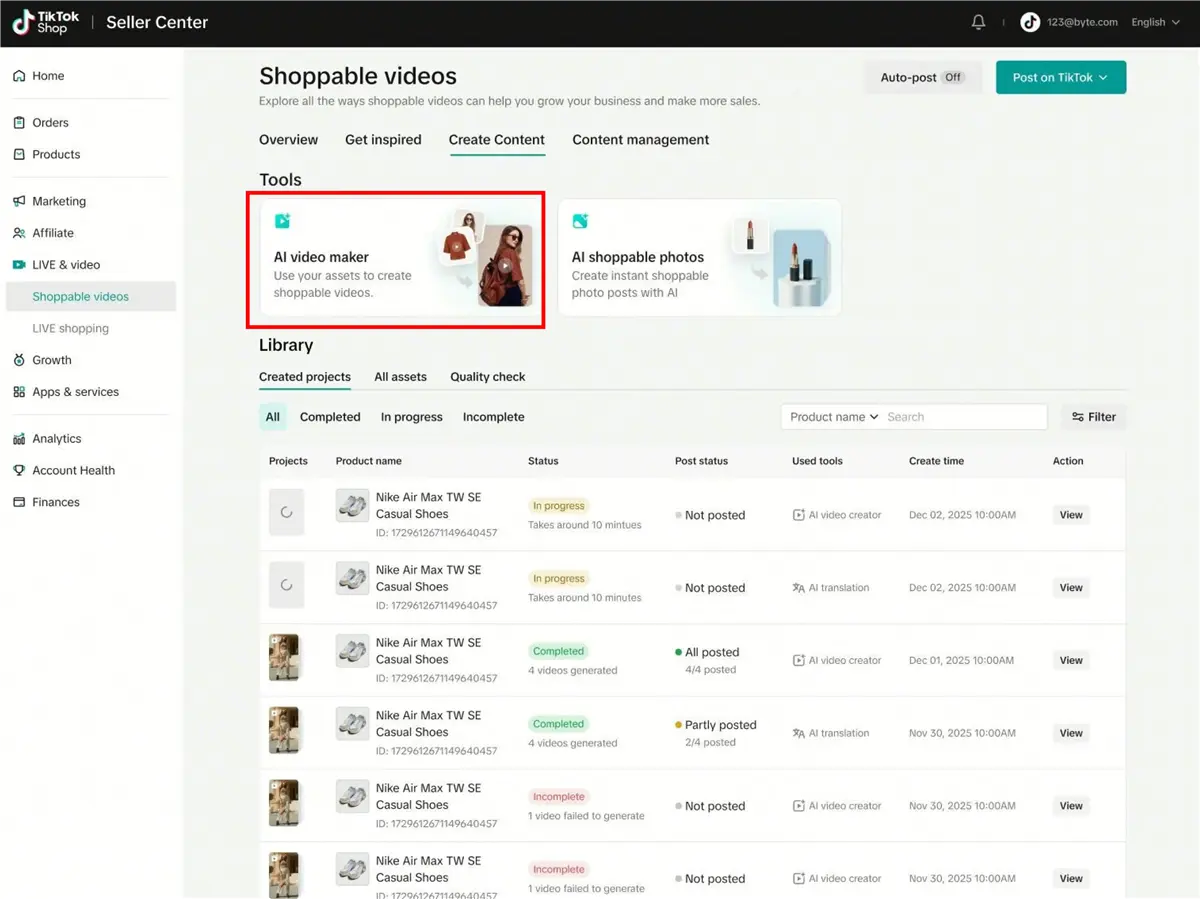
Third-Party AI Video Tools for TikTok Shop
If TikTok's native tool isn't available in your region or doesn't fit your needs, several third-party platforms offer AI model video generation:
CapCut: AI video creation with templates, auto-captions, and product-focused formats.
Canva AI Video Generator: Converts product images into short videos with text overlays and music — good for simple product showcases.
Oumomo: Specialized AI video creation for shoppable TikTok content, trained on high-converting e-commerce patterns with features like "Viral Remake" and "URL-to-Video."
💡 Pro tip: The best-performing TikTok Shop videos mix AI-generated content with real footage. Use AI to create the base visual (model showing the product), then overlay real voiceover, on-screen text, and customer review highlights. Pure AI content without a human touch tends to underperform in engagement.
Best for: Sellers who want to increase video output without filming every clip. Especially useful for creating multiple variations of the same product for A/B testing different hooks, music, and angles.
Method 3: Create AI Model Photos/Video with Koozee Virtual Try-On Tool
Using TikTok's built-in tools is free and straightforward to create models for TikTok Shop, but they come with certain limitations — regional restrictions, lack of on-model options, etc. In this case, a powerful AI visual platform like Koozee becomes advantageous for TikTok sellers. Designed specifically for apparel e-commerce sellers, Koozee generates AI model photos and videos effortlessly.
What Koozee Covers
Koozee consolidates six visual production functions into one workflow:
AI Apparel Try-On: Generate on-model photos from your flat-lay or mannequin product images. Supports diverse model types, poses, and backgrounds — including specialized try-on for lingerie, swimwear, and bodycon apparel that many general AI tools restrict.
AI Product Videos: Turn product images into dynamic lookbook clips, viral video clones, and short outfit videos formatted for TikTok.
AI Product Images: Create main listing images, detail shots, flat lays, ghost mannequin visuals, and scene/background changes — all from existing product photos.
Listing Page Visuals: Generate product listing pages that can be previewed and cropped for TikTok shops.
Basic Utility Tools: AI cutout, image enhancer, and video enhancer for polishing existing assets.
Shopify Integration: Connect your Shopify store to reuse product images directly, generate visuals, preview results, and publish approved assets back to Shopify.
How to Generate AI Models for TikTok Shop Using Koozee
Step 1. Sign up for Koozee. Every new user can claim 30 free credits to test before buying.
Step 2. Upload your clothing product image — a clear flat-lay or ghost mannequin photo works best.
Step 3. Choose your output type:
For listing images → select "AI Try-On" and pick a model style that resonates with your TikTok audience.
For TikTok videos → choose "Dynamic Lookbook" or "Viral Video Clone" to create short-form video content.
For detail shots → use "Detail Image" or "Change Scene" for close-up product visuals.
Step 4. Customize the model and scene — select body type, skin tone, pose, and background. Koozee supports model diversity, so you can create visuals tailored to different audiences.
Step 5. Generate and review the produced photos/videos. Review each for fabric drape, color accuracy, and overall realism.
Step 6. Download and upload to TikTok Shop. Remember to apply TikTok's AI disclosure label before publishing.
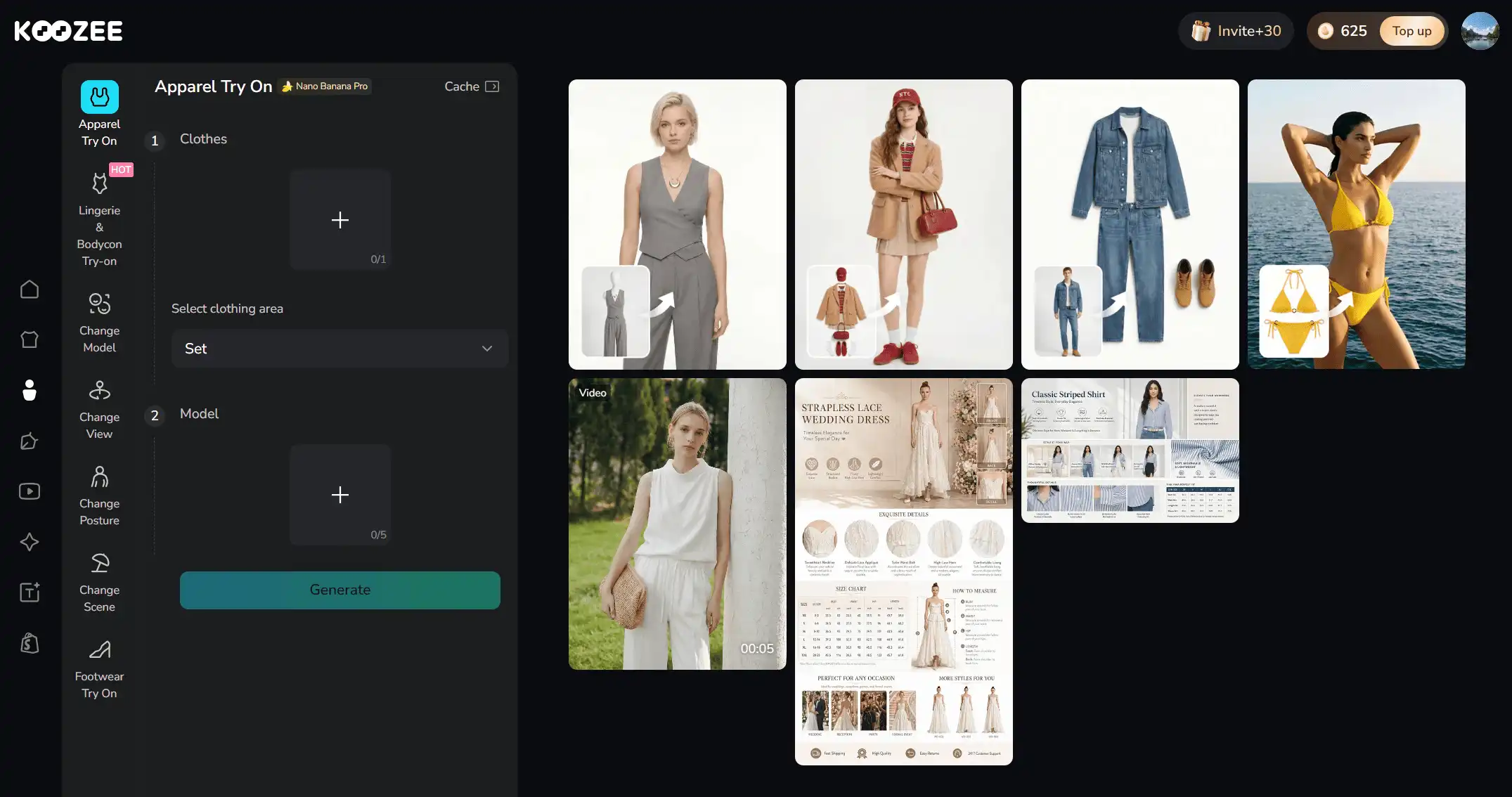
⚠️ Important: AI-generated images vary in quality depending on clothing complexity. Simple garments (t-shirts, basic dresses) typically produce excellent results. Intricate patterns, sheer fabrics, and heavily structured garments may require more careful review. Always inspect outputs before publishing to TikTok Shop.
Best for: Apparel sellers managing 10+ SKUs who want to replace fragmented tools with one visual production workflow. Especially strong for sellers in categories that many general AI tools cannot handle well: lingerie, swimwear, bodycon dresses, and fitted fashion.
AI Model Tools for TikTok Shop: Quick Comparison
| Tool / Platform | Type | Best For | Free Tier | Pricing | Regional Limits |
| TikTok AI Photo Maker | Native listing images | Basic product shots, backgrounds | ✅ Yes (included) | Free | US, UK, EU sellers only |
| TikTok AI Fashion Video Maker | Native video generation | Quick product videos from images | ✅ Yes (included) | Free | US sellers only |
| Koozee | Full visual workflow | Apparel try-on, videos, listing assets | ✅ 30 free credits | $22.9/mo or $0.03-0.05/credit | Available for all TikTok sellers |
💡 Pro tip: You can start with the built-in tools and test if they are beneficial to your TikTok Shop. If those aren't available in your region, try using Koozee's free credits to generate fashion clothing images and videos for your customers.
Conclusion
Using AI models for TikTok Shop is no longer just a futuristic concept; it is a practical, cost-effective necessity for modern apparel commerce. By leveraging AI to create model try-ons, fit check videos, and dynamic lookbooks, you can scale your content instantly. AI can speed up apparel content production, but sellers remain responsible for reviewing every generated image or video to ensure it accurately represents the product before publishing.
Always adhere strictly to TikTok's content policies by clearly labeling your AI visuals and representing your products accurately. Platforms like Koozee provide one unified AI workflow for apparel product images, try-ons, videos, and listings. Start turning your flat clothing photos into viral, appealing visuals and improve your TikTok Shop browsing experience!
Frequently Asked Questions
Are AI-generated models allowed on TikTok Shop?
Yes. TikTok allows AI-generated product visuals as long as you apply the platform's AI-generated content label before publishing. You can enable this through the "AI-generated content" toggle in post settings or by adding visible disclosure text on-screen. TikTok prohibits using AI to misrepresent products or deceive customers about what they will receive.
Will customers trust AI model photos?
The data is mixed. Some shoppers prefer real model photography and can be skeptical of AI-generated images. The general consensus among sellers is to use AI model photos as supplementary visuals — Clearly disclose AI-generated content and ensure that your visuals accurately represent the product. Transparency is part of TikTok's AI content policy.
Can I use AI models instead of real models for all my TikTok Shop content?
You can, but it is usually not the optimal strategy. The best-performing TikTok Shop stores typically blend AI-generated visuals with authentic content — real unboxing clips, customer review videos, behind-the-scenes footage, or live selling sessions.
Do AI try-on tools work for all types of clothing?
Not entirely. Results vary significantly by garment type. Simple clothing — t-shirts, hoodies, basic dresses, casual tops — generally produces the best AI try-on results. Intricate patterns, sheer fabrics, heavy embellishments, and highly structured garments can yield inconsistent output.
What's the difference between AI models and AI try-on?
AI models refer broadly to any AI-generated person or avatar used in product visuals. AI try-on mostly means a specific application where your actual product image is digitally fitted onto a virtual model. The distinction matters because simple "AI model" generators often just place a product near a generated person, whereas true AI try-on renders the garment on the body with fabric physics and fit considerations.
Can I use AI models if I sell on TikTok Shop and Shopify simultaneously?
Yes, platforms like Koozee provide an integrated workflow for both TikTok and Shopify stores. It lets you pull product images directly from your store, generate new AI visuals, preview results, and publish approved assets back to Shopify — while also exporting TikTok-formatted versions for your Shop content.
What resolution do AI model images need for TikTok Shop?
AI model images for TikTok Shop require a minimum resolution of 600 x 600 pixels in a 1:1 (square) aspect ratio. However, a resolution of 800 x 800 or 1080 x 1080 pixels is highly recommended for optimal quality.
You May Be Interested

9 Best AI Fashion Model Generators for E-commerce (2026)
Flat Lay to Model AI: Turn Flat Lay Clothing Photos into On-Model Images

How to Change Model Face in Product Photos: 4 Methods for Apparel Sellers
