9 Best WooCommerce Virtual Try-On Plugins for Apparel Sellers


When shoppers browse a WooCommerce clothing store, they are not only searching for a beautiful garment, but also wondering how it looks on a body. Integrating a WooCommerce virtual try-on plugin directly addresses this friction. By adding an interactive AI or AR fitting room to your product pages, you allow customers to upload personal photos or select matching AI models to preview garments before checkout. This guide breaks down how virtual try-on technology works, why it is essential for apparel stores, and reviews the 9 top plugins available today to help you select the ideal solution for your business.
Key Takeaways
Bridge the Online Fit Gap: A WooCommerce virtual try-on plugin lets customers preview garments on themselves or AI models, dramatically reducing purchase uncertainty.
Measurable ROI: Integrating virtual fitting technology can increase store conversions by 30%–40% and reduce fit-related returns by up to 50%.
Two Core Technologies: Choose between Generative AI (photorealistic rendering from single photos) and 3D WebAR (real-time camera overlays and 3D product previews).
Low Setup Overhead: Modern AI plugins generate try-on views from your existing product photography—no expensive 3D asset modeling required.
Upstream Visual Creation: Store plugins handle frontend shopper interactions, while platforms like Koozee help you generate model photos, video lookbooks, and listing assets upfront.
What Does a WooCommerce Virtual Try-on Plugin Do?
A WooCommerce virtual try-on plugin is an e-commerce extension that adds an interactive fitting room directly to your product detail pages. It transforms static garment photos into dynamic visual previews, helping shoppers see how garments will look on themselves before buying.
From an architectural standpoint, these plugins operate across two main layers:
Frontend Customer Interface: On the product page, a customizable "Virtual Try-On" or "Try It On" button triggers a lightweight modal window. Customers can upload a mirror selfie, upload a full-body photo, or select from pre-configured AI models matching their age, gender, and body type.
Backend Processing Engine: Once submitted, the plugin connects via API to an AI generation engine (such as Google Gemini, Stable Diffusion, or dedicated computer vision servers). The AI isolates the garment, analyzes lighting and fabric drape, maps it onto the target body contour, and renders a realistic visual output in seconds.
Store owners manage everything from the WordPress admin dashboard—configuring generation quotas, adjusting custom AI prompt settings per SKU, toggling guest access, and monitoring usage metrics.
Why Virtual Try-On Matters for WooCommerce Clothing Stores
Integrating a good virtual try-on plugin transforms your storefront performance across several key metrics:
Lower Return Rates: Sizing and fit style mismatches cause over 60% of online clothing returns. Virtual fitting sets realistic expectations before checkout, keeping inventory in your warehouse instead of in transit.
Higher Conversion Rates & Average Order Value (AOV): Seeing a garment rendered on a human silhouette builds instant purchasing confidence, driving conversion lifts between 30% and 40%.
Increased On-Site Engagement: Interactive features keep shoppers on your product pages up to 180% longer, signaling high user engagement to search engines.
Reduced Model Photoshoot Expenses: Instead of hiring models for every colorway and sizing variation, virtual try-on tech uses existing flat lays or studio images to display items on diverse body types.
Quick Comparison Table
| Plugin Name | Primary Focus | Pricing Model | Best For | Setup Complexity |
| Mirrago | Fashion & Apparel | Subscription-based | Mid-to-large fashion brands | Low |
| Genlook | Apparel, Swim, Accessories | Free tier + Subscription-based plans | Fast-growing fashion stores | Low |
| TryonX | Direct Garment Fitting | BYOK model | Budget-conscious sellers | Medium |
| TryAura | Casual & Streetwear | BYOK model | Boutique fashion stores | Medium |
| Webkul Virtual Try-On | Apparel & Custom AI Models | Subscription-based | Established merchants | Medium |
| Preview AI | Fast Visual Previews | Subscription-based | High-traffic apparel sites | Low |
| TryLoom | Dresses & Fitted Tops | Subscription-based | Womenswear & boutique fashion | Low |
| Tryly | Basic Garment Previews | Subscription-based | Early-stage WooCommerce stores | Low |
| Zakeke | Apparel, Eyewear, Custom | Subscription-based | Brands needing 3D + AR fitting | Medium |
1. Mirrago
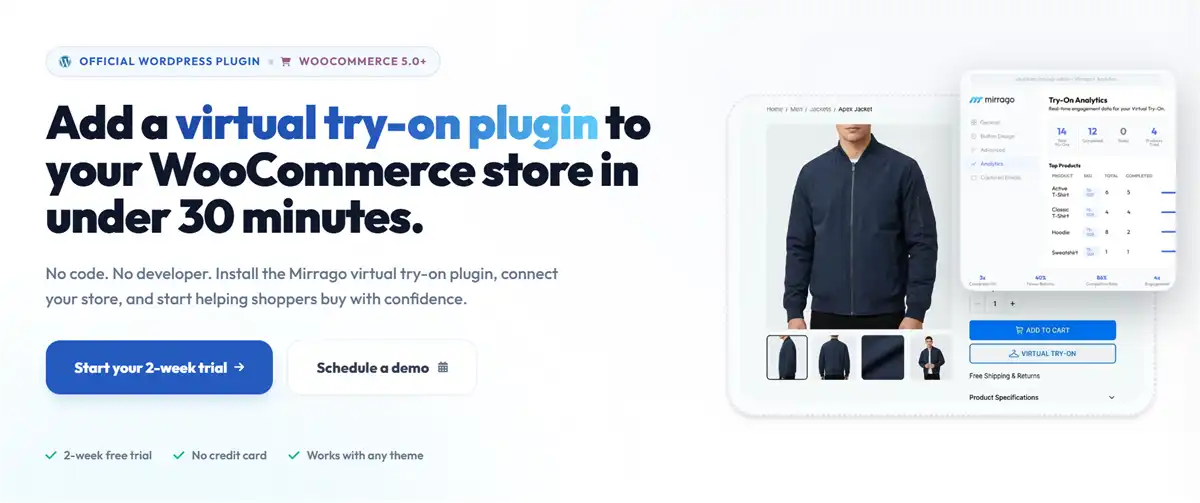
Mirrago is a generative AI virtual try-on plugin engineered specifically for modern fashion retailers. It bridges high-end computer vision with standard WooCommerce product listings, allowing shoppers to upload personal photos and preview garments with realistic drape and texture retention. Mirrago analyzes fabric behavior, sleeve alignment, and waist contours to render hyper-realistic visuals.
The plugin features a clean modal overlay that embeds smoothly into standard WooCommerce theme structures. Admins can monitor generation volume, set customer usage caps, and control rendering parameters directly from the WordPress dashboard.
Pros:
Delivers realistic drape and lighting matching.
Simple setup requiring no complex 3D asset modeling.
Preserves intricate clothing patterns and logos.
Native WooCommerce and Shopify support.
Cons:
Higher cost structure compared to entry-level options.
Performance relies on high-resolution original product photos.
Pricing: Subscription-based. 14-day free trial. Launch plan at $249/month (500 try-ons); Scale plan at $599/month (2,000 try-ons); Enterprise at $1500+/month (5000+ try-ons).
Best for: Clothing stores where try-on realism directly impacts purchase decisions — dresses, outerwear, fitted garments, and premium apparel.
2. Genlook
Genlook brings advanced generative AI try-on technology to WooCommerce via an official WordPress plugin connected to a cloud AI backend. Designed for rapid deployment, merchants can install the extension, enter their API key, and enable virtual try-on across their product catalog in a few minutes.
By clicking the try-on button, uploading a mirror selfie, and viewing the selected clothing item, shoppers can preview how it renders on their body in seconds. Genlook supports a wide spectrum of apparel categories, including dresses, shirts, outerwear, swimwear, and accessories.

Pros:
Extremely easy setup with no developer skills required.
Generative AI engine that handles varied product types well.
Uses existing product images straight from your store.
Includes a free plan to test conversion impact before upgrading.
Cons:
Generative output quality varies if shoppers upload poorly lit selfies.
Monthly generation caps apply to lower-tier plans.
Pricing: Subscription-based. Free plan (10 try-ons/month). Starter plan at $19.99/month (100 try-ons); growth plan at $29/month (250 try-ons); Pro plan at $99/month (1000 try-ons).
Best for: Multi-category stores that want one VTO solution for everything, and sellers who value fast setup over deep customization.
3. TryonX
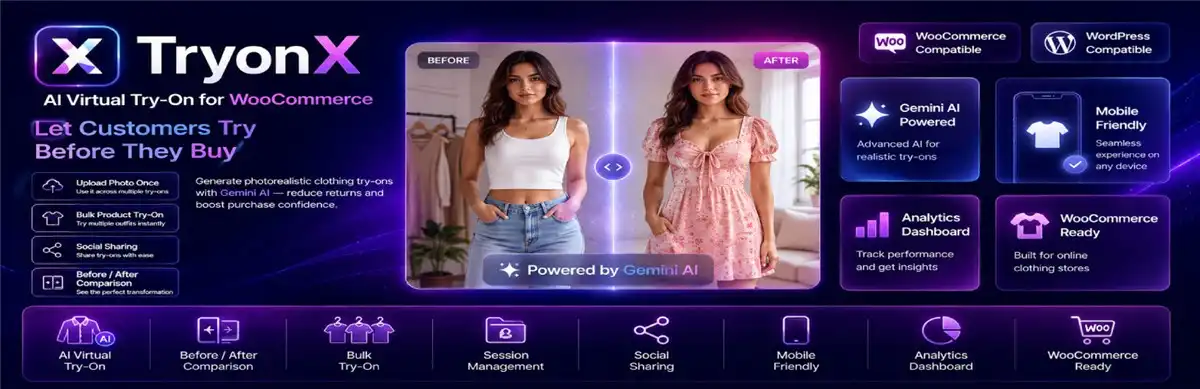
TryonX is an accessible, budget-conscious WooCommerce virtual try-on plugin that leverages image diffusion models to map clothing items onto user-submitted photos. Built specifically for small-to-medium e-commerce operators, TryonX eliminates technical complexity while offering essential virtual fitting features.
It runs on Google Gemini, which means you provide your own API key and pay Google directly for generation costs. This BYOK (Bring Your Own Key) model keeps the plugin itself affordable but shifts the running cost variable to your API usage. The backend control panel lets store owners customize button placement, choose modal accent colors, and adjust generation settings per product category.
Pros:
Gemini-powered AI try-on with consistent, quality output and affordable entry cost for small stores.
Quick installation through the standard WordPress plugin interface.
Minimal impact on page load speed.
Analytics dashboard showing try-on usage and product engagement.
Cons:
May struggle with complex, layered outfits.
Fewer advanced customization controls for enterprise workflows.
Requires a Gemini API key and basic understanding of Google Cloud billing.
Pricing: BYOK model - free to install the plugin, but you should pay Google Gemini API fees per generation.
Best for: Mid-sized clothing stores that want data-driven insights about which products drive engagement, and stores comfortable managing API costs.
4. TryAura
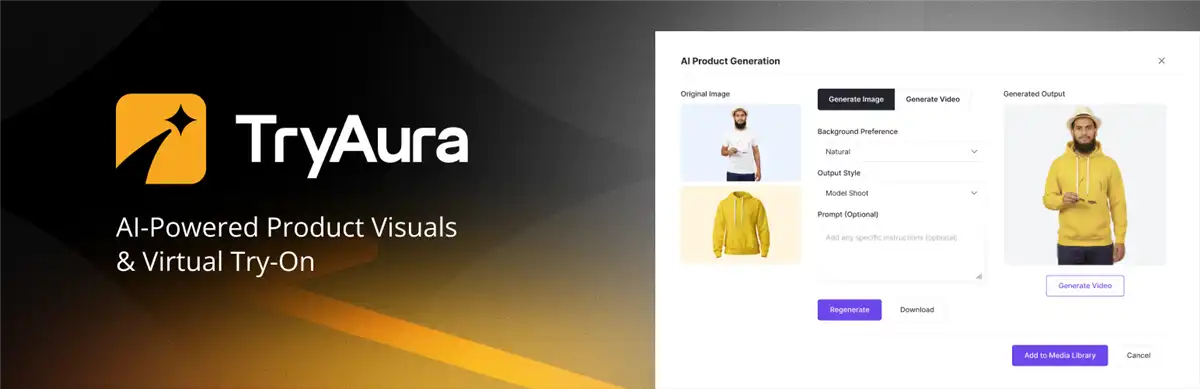
TryAura packages virtual try-on alongside AI image generation and video generation in a single WooCommerce plugin. It focuses on silhouette mapping and intelligent lighting integration for streetwear, athletic wear, and casual apparel brands. By analyzing both the lighting in the customer's photo and the target garment's highlights, TryAura produces balanced visual overlays.
The try-on feature lets shoppers upload a photo or use their camera to see how a garment looks on them. The broader AI toolkit can generate alternative product images, lifestyle shots, and short product videos — all from your existing product photos.
Pros:
Exceptional rendering on casual wear, hoodies, and T-shirts.
Fast mobile processing times reduce cart drop-offs.
Simple dashboard analytics tracking try-on clicks.
Cons:
Less accurate rendering on sheer, lace, or transparent fabrics.
Fixed monthly pricing may not suit ultra-low-volume stores.
Video generation costs can add up quickly.
Pricing: BYOK model — you provide the Gemini API key. Generation costs go straight to Google at standard API rates.
Best for: Clothing stores that want both VTO and AI-generated product media without managing multiple tools or subscriptions.
5. Webkul Virtual Try-On
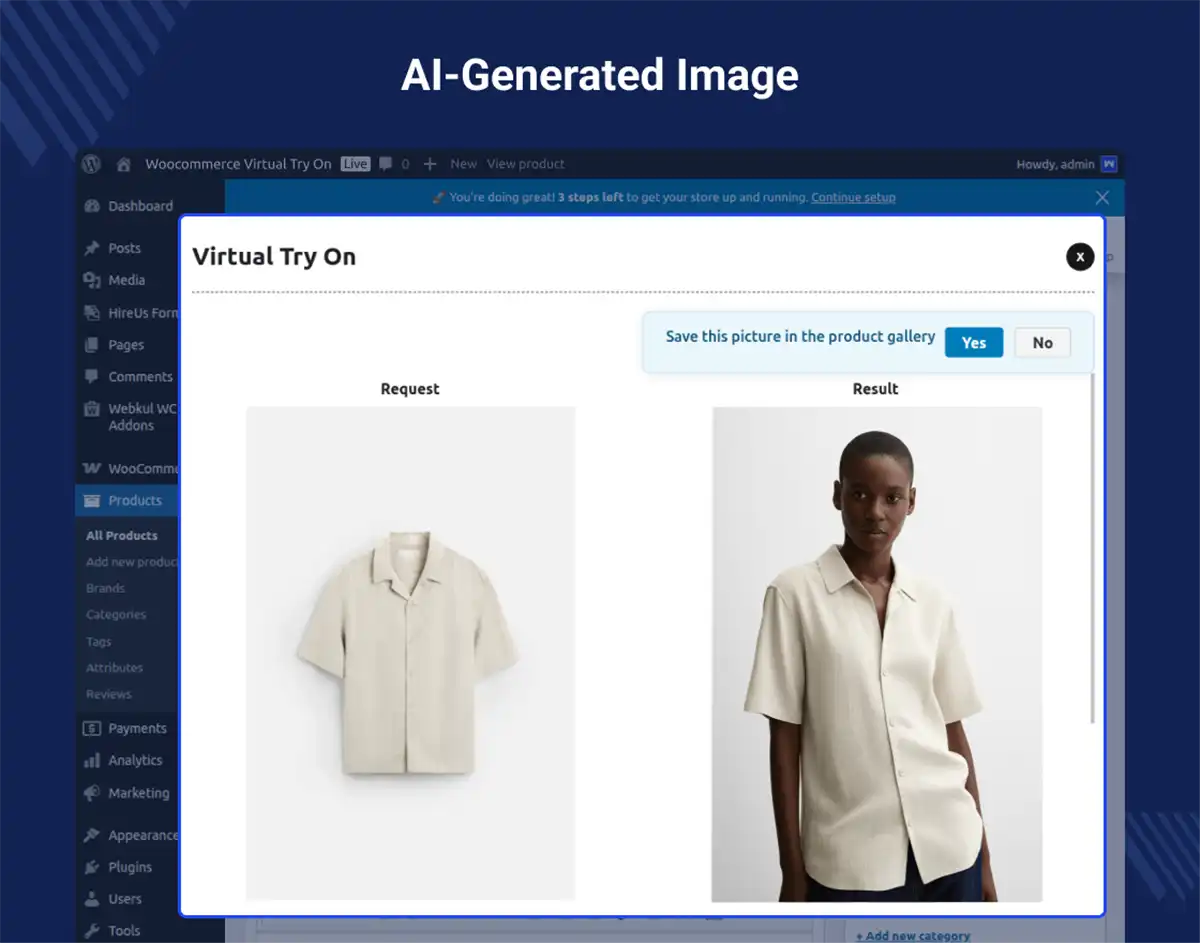
Webkul Virtual Try-On for WooCommerce is a robust plugin powered by Google Gemini AI engines. It gives store administrators granular control over how try-ons are offered. Beyond user photo uploads, admins can create and manage preset AI models based on specific age groups, genders, and body types.
The plugin overlays selected clothing items onto customer-uploaded images. It's not the flashiest solution, but it's reliable and well-documented — important if you've been burned by half-baked WooCommerce plugins before.
Pros:
Clean WooCommerce integration with standard product types.
Presets offer an alternative for privacy-conscious shoppers.
Extensive admin settings for prompt tuning and access control.
Cons:
Higher upfront license cost.
Initial configuration requires API key setup and prompt tuning.
Try-on is limited to apparel; no accessories, footwear, or multi-category support.
Pricing: Subscription-based. $299/3 months; $418.6/6 months; $448.5/year.
Best for: Established WooCommerce merchants seeking a long-time purchase solution with comprehensive backend control.
6. Preview AI
Preview AI does virtual try-on for tops, bottoms, and dresses at a lower cost compared to its competitors. Built for high-traffic stores, this extension emphasizes rapid garment warping and quick client-side rendering. With the Preview AI plugin, shoppers can upload a photo on the product page and instantly see how a product looks on them. Additionally, it includes a unique multi-item preview mode, allowing shoppers to test tops and bottoms together in a single fitting session.
The setup is also simple. Install, connect your product images, and the Virtual Try-on button appears on product pages. No API key configuration, no model selection screens — just a working try-on experience.

Pros:
Integration directly on the product page is better for conversion rate.
Rapid rendering speeds minimize customer wait times.
Multi-item pairing encourages cross-selling and higher AOV.
Scalable cloud backend handles high traffic spikes easily.
Cons:
Visual output can appear slightly stylized compared to high-end diffusion tools.
Advanced multi-garment features require higher-tier plans.
Pricing: Subscription-based. Mini plan at $9.9/month (60 previews); Starter plan at $19/month (150 previews); Growth plan at $49/month (500 previews); Enterprise plan at $299/month (4000 previews).
Best for: Independent fashion stores that want a lightweight, no-hassle VTO solution and don't need support for non-apparel categories.
7. TryLoom
TryLoom is one of the best WooCommerce virtual try-on plugins tailored for womenswear, dresses, formalwear, and fitted tops. It uses contour-mapping algorithms designed to accurately render fitted silhouettes, waistlines, and neckline drapes without distorting garment prints. TryLoom works directly with flat product images — the kind you'd take on a mannequin or flat-lay setup — and generates try-on visuals from those.
Built specifically for non-technical store owners, TryLoom operates entirely out of the box. Once activated from the WordPress plugin directory, it seamlessly syncs with your existing WooCommerce media library. No API keys, no model selection, no technical overhead.

Pros:
Consistent output quality for standard apparel categories.
Superior fidelity on fitted dresses and complex waist contours.
Generates high-resolution previews.
Clear visual representation of fabric texture and pattern flow.
Cons:
Processing times can take slightly longer (5–10 seconds per output).
Try-on quality with complex garments (patterns, textures, delicate fabrics) is less consistent.
Limited focus on footwear and rigid accessories.
Pricing: Subscription-based. Spark plan at $19/month (100 try-ons); Flare plan at $59/month (350 try-ons); Loom plan at $149/month (1000 try-ons).
Best for: Small clothing stores using flat-lay or mannequin product photography. Womenswear boutiques, dress designers, and formal fashion retailers who want to add try-on without investing in new product images.
8. Tryly.ai Virtual Try-On for WooCommerce
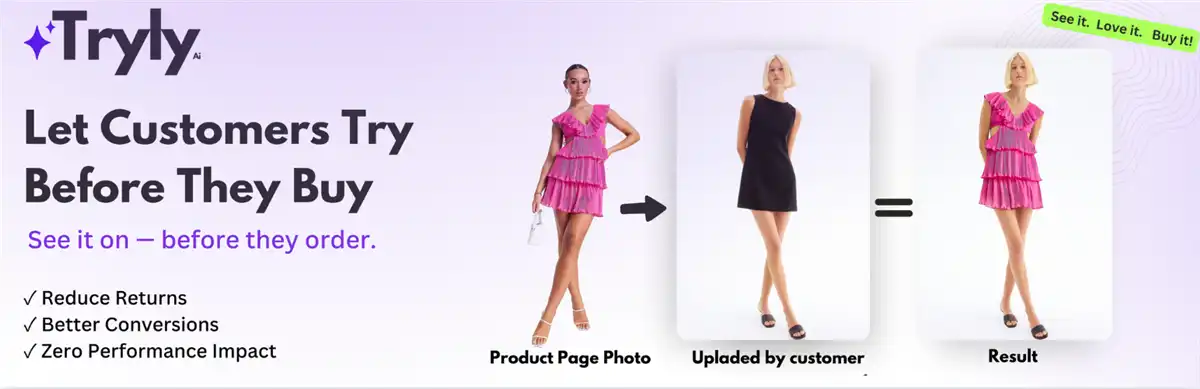
Tryly.ai Virtual Try-On for WooCommerce is an official WordPress repository plugin that turns standard product detail pages into interactive AI fitting rooms. Built specifically for WordPress integration, Tryly allows online shoppers to upload a full-body photo or capture a live selfie directly using their device's camera. The plugin's cloud-based AI engine automatically extracts the apparel item from your product gallery, adjusts for body posture and lighting, and overlays the garment onto the user's photo with natural drape, fabric folds, and accurate proportions.
Store administrators can manage settings directly within the WordPress dashboard. Tryly offers flexible button placement, custom button styling to match your theme's branding, and support for multiple apparel categories including tops, bottoms, dresses, and outerwear.
Pros:
Free to install and test directly from the official WordPress plugin directory.
Allows shoppers to take live photos on mobile devices without leaving the store.
Easy setup with intuitive WordPress admin controls and no coding requirements.
Cons:
Fewer customization options than premium competitors.
Output accuracy relies on clean, high-resolution product photography.
Pricing: Subscription-based. Lite Plan at $12.97/month (120 try-ons); Plus Plan at $27.97/month (300 try-ons); Pro Plan at $59.99/month (700 try-ons); Studio Plan at $149.97/month (1600 try-ons).
Best for: Small-to-medium WooCommerce fashion stores seeking an officially vetted, easy-to-install WordPress plugin with live camera try-on capabilities.
9. Zakeke
Zakeke virtual try-on redefines the virtual fitting experience by moving away from static, photo-based generative AI and stepping into real-time Augmented Reality (AR). As a comprehensive 3D product configurator and AR platform, Zakeke’s Virtual Try-On (VTO) solution allows shoppers to use their smartphone or desktop camera to see products on themselves in real-time. Whether it is eyewear, hats, jewelry, watches, or clothing, the digital item anchors to the user's face or body and moves exactly as they do.
The entire AR experience occurs natively in the customer's mobile or desktop browser, on the WooCommerce product page. Furthermore, Zakeke's VTO seamlessly integrates with its customization engine. This means a customer can actively design a product—like changing the strap on a watch or the color of a hat—and immediately view their customized creation on themselves via the live camera feed.

Pros:
Delivers a highly interactive, premium experience as products move with the user in real-time.
Full product customization suite (text, images, designs, colors).
Perfectly pairs with customizable or personalized product catalogs.
Cons:
Setup and configuration are more complex than single-purpose VTO plugins.
Real-time AR tracking is currently optimized for rigid accessories rather than soft, highly draped clothing.
Pricing: Subscription-based. Starter plan at $69.9/month; Grow plan at $129.9/month; Scale plan at $299.9/month; Enterprise plan is account-based; you can contact sales for final pricing.
Best for: Premium brands selling customizable or personalized apparel, print-on-demand shops, and sellers who need both customization and try-on in one tool.
Bonus: Koozee — Full AI Visual Production for Apparel Sellers
Here is a hard truth about WooCommerce: installing too many frontend interactive plugins can slow down your page load speed, hurting your SEO and mobile conversion rates.
If you want to offer your customers stunning model try-ons without adding heavy plugin scripts to your product pages, the smartest strategy is to generate those visuals upstream.
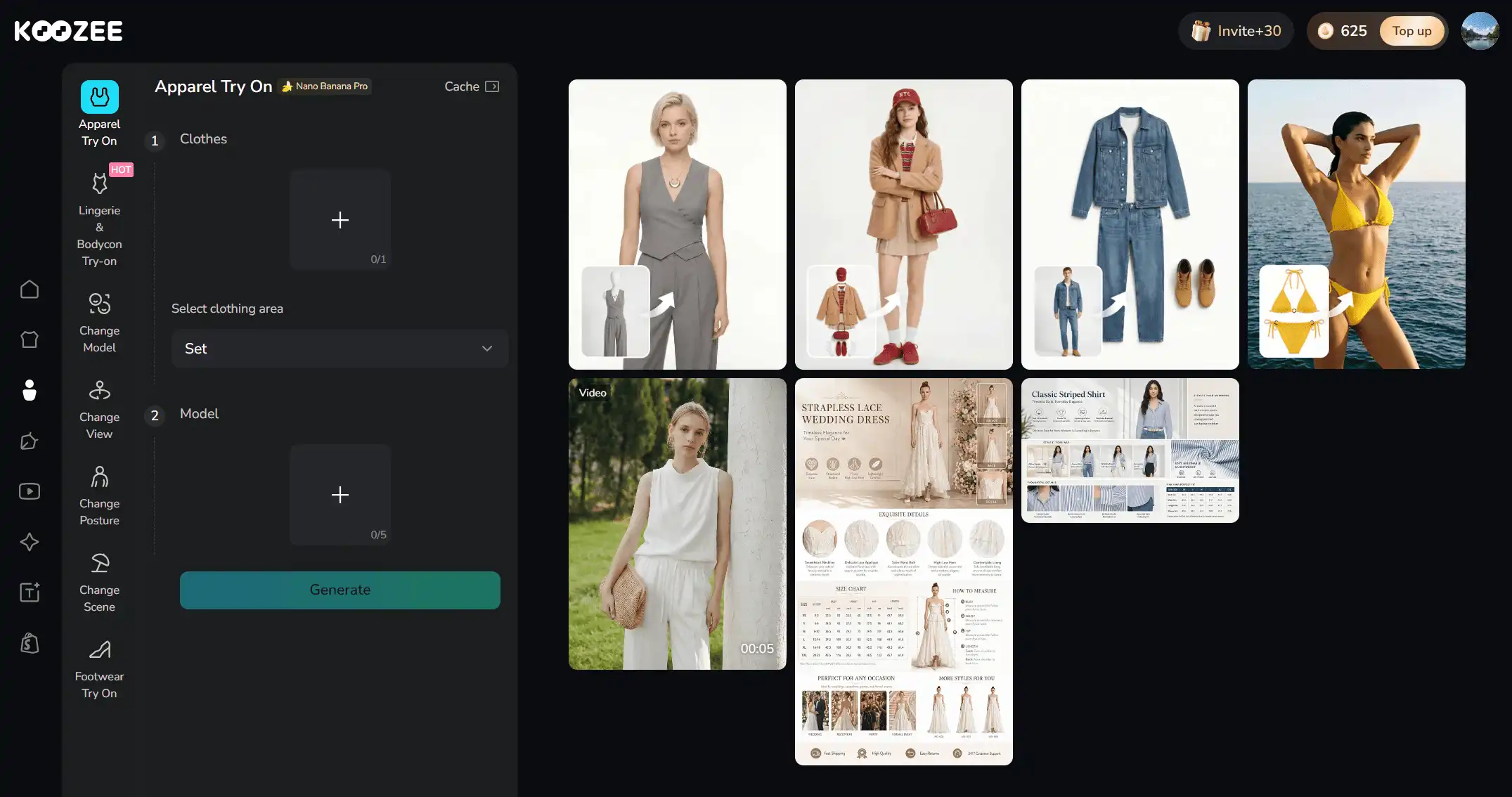
Koozee is an AI visual production platform built specifically for apparel e-commerce. Instead of installing a storefront plugin for buyers, you use Koozee's workspace to turn your flat-lay clothing photos into high-converting, on-model try-on images and dynamic videos before you list the product.
Core Capabilities for Apparel Sellers
AI Model & Apparel Try-On: Upload flat lays, garment shots, or existing product photos to instantly generate photorealistic model try-ons. Change models, ethnicities, scenes, poses, and viewing angles to localize your brand across global markets.
Specialized Lingerie, Swimwear, & Bodycon Try-On: Specialized, e-commerce-safe try-on workflows for lingerie, shapewear, bikinis, and fitted bodycon apparel—categories where traditional photoshoots are costly.
Product Image to Video Workflows: Turn static garment photos into dynamic visual content. Create lookbook videos, OOTD / fit check clips, short outfit edits, and viral product video clones designed for TikTok, Instagram Reels, and ad campaigns.
Listing-Ready Assets & Basic Utilities: Generate structured product page visuals, flat lays, ghost mannequin effects, and campaign posters. Utilize built-in tools like AI background cutouts, image upscaling, and watermark removal to prepare catalog images.
By utilizing Koozee to build your catalog visuals upstream and deploying a WooCommerce virtual try-on plugin downstream, you create a complete end-to-end visual engine that drives traffic and converts shoppers.
Final Words
Selecting the right WooCommerce virtual try-on plugin depends on your store's tech stack, budget, and catalog type. Whether you choose generative AI plugins like Genlook for quick setups or WebAR engines like Zakeke for custom items, offering interactive fitting rooms reduces buyer doubt and slashes return rates. Pair your on-page plugin with platforms like Koozee to produce store-wide model photography and lookbook videos, giving your apparel brand a high-converting edge in 2026.
FAQ: WooCommerce Virtual Try-On Plugins
What is an AI virtual try-on plugin for WooCommerce?
A virtual try-on plugin lets your customers see how a clothing item looks on them by uploading their photo or using their device camera. AI models then render the garment onto their image, simulating fit, fabric, and lighting.
How do virtual try-on plugins work on WooCommerce?
Most plugins add a modal button to your product template. When clicked, customers upload a photo or choose an AI model preset. The plugin sends this data to an AI rendering engine, which maps the product onto the body contour and generates a realistic visual preview.
Do I need to provide model photos for virtual try-on to work?
Not necessarily. Several plugins — including TryLoom, TryonX, and Koozee — work with flat product images. The AI generates the try-on visual from your standard product photos. This is a major advantage for independent sellers who don't have professional model shots.
Will a virtual try-on plugin slow down my WooCommerce store?
Most well-built VTO plugins load asynchronously, meaning the try-on feature loads after your product page renders. The try-on generation itself happens on the plugin's servers (or Google's, for Gemini-based tools), not your hosting.
Can virtual try-on work with variable products (size, color)?
Yes — most plugins on this list support WooCommerce variable products. The try-on experience typically uses the selected variation's product image. Check each plugin's documentation, but variable product support is now table stakes for VTO plugins.
Is virtual try-on compliant with GDPR and privacy regulations?
This depends on the plugin. If customer photos are processed entirely on your server (rare), GDPR compliance is straightforward. If photos are sent to a third-party AI API (common with Gemini-based tools), you need to disclose this in your privacy policy and ensure the API provider's data handling meets GDPR standards.
How does Koozee compare to a WooCommerce virtual try-on plugin?
An on-page WooCommerce virtual try-on plugin is an interactive storefront widget for buyers visiting your product pages. Koozee is an upstream AI visual production platform used by sellers to generate model photos, intimate try-on visuals, listing images, and lookbook videos before launching products online.
You May Be Interested
7 Best AI Try-On Clothes Tools in 2026

8 Best Virtual Try-On Apps for Cosplay Costumes (2026)

Top 10 Virtual Try-on Apps for Shopify (2026)
