From Flat Lay to Model: How AI Turns Clothing Photos into On-Model Images
Learn how to turn flat lay clothing into model images using AI tools.


Your flat lay images may look clean and professional — but they don’t sell the fit. Shoppers can’t easily visualize how clothing drapes or looks on a real person, and that uncertainty hurts conversions. Research from the Shopify product photography guide shows that lifestyle and on-model images consistently outperform flat or studio-only shots, especially in fashion.
But producing on-model images at scale is expensive and slow. That’s why more brands are turning to flat lay to model AI — transforming static product photos into realistic on-model visuals in minutes. This guide shows how it works, which tools perform best, and how to keep your results true to the actual garment.
Key Takeaways
Flat lay to model AI is becoming practical for apparel sellers: Modern AI tools can convert a flat lay clothing photo into a realistic on-model image in under a minute — no photoshoot required.
Fabric preservation matters: The best tools use garment-aware AI that understands fabric physics, drape, and fit — not just image compositing. Input quality directly affects output quality.
Apparel-specific tools outperform generic AI: Tools built for clothing e-commerce (like Koozee) produce better garment fidelity than general-purpose image generators.
Consistency is the real challenge: For sellers with large catalogs, maintaining consistent model identity, lighting, and style across hundreds of SKUs is where most tools fall short.
Start with your best flat lays: Clean, wrinkle-free, well-lit flat lay photos on a neutral background give AI the clearest garment data to work with — and produce the most accurate on-model results.
What Is Flat Lay to Model AI — and Why Apparel Sellers Are Using It
Flat lay to model AI is a technology that transforms flat product photos into realistic, on-model e-commerce images. Instead of a clumsy cut-and-paste job, advanced apparel-specific AI analyzes the garment's texture and structure to simulate how it drapes and stretches on a human body.
For clothing sellers, this addresses a major scaling bottleneck. Traditional photoshoots—covering models, studios, and editing—easily cost hundreds to thousands of dollars per session while managing only a handful of SKUs. AI rewires this economics entirely, turning flat catalog shots into listing-ready model visuals after review.
📌 Quick Note: This technology delivers the highest fidelity on structured garments (tops, dresses, jackets, trousers). Complex variants like ultra-sheer fabrics or heavily layered outfits may require a quick manual review before publishing
How to Turn Flat Lay Clothing into Model Images: The Step-by-Step Process
Step 1: Prepare Your Flat Lay Photo
The quality of your input directly determines the quality of your output. AI tools need clear garment data to reconstruct how the clothing will look on a body.
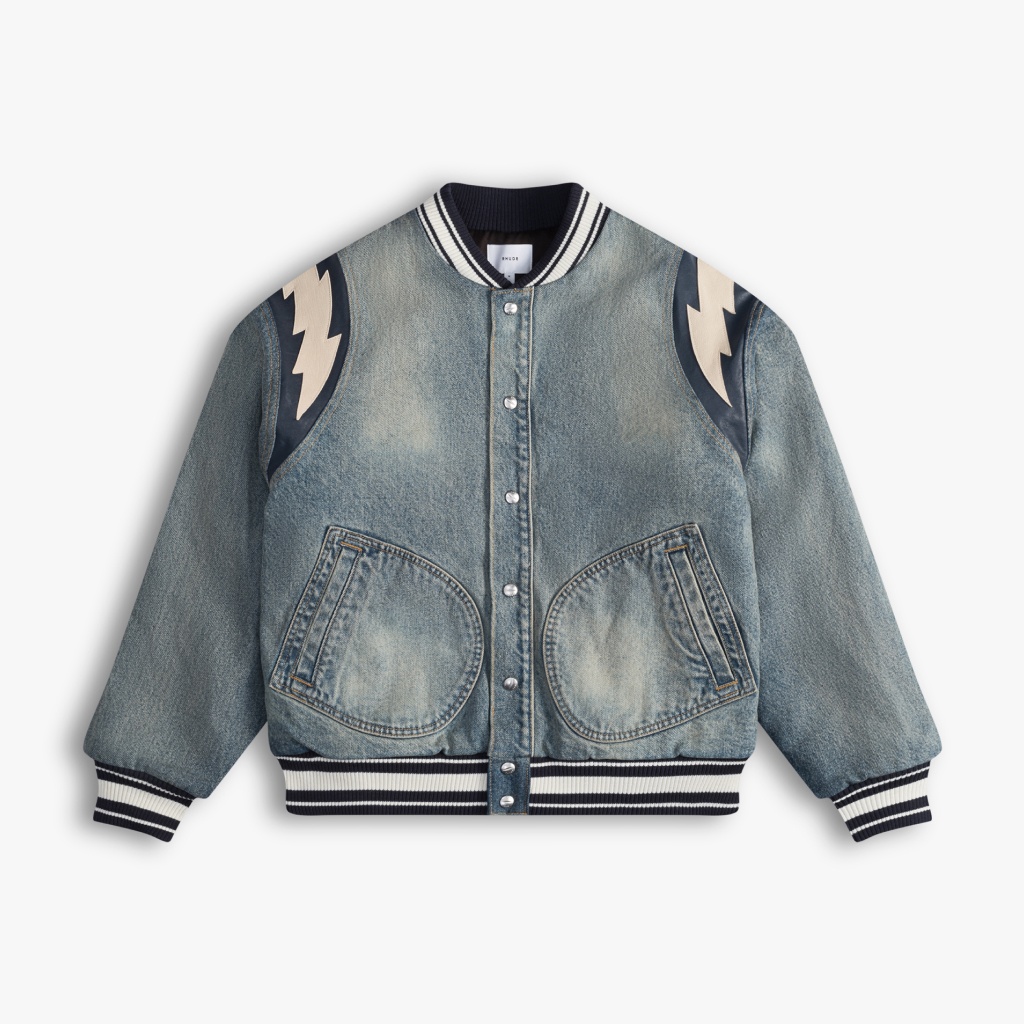
What makes a good flat lay for AI conversion:
Shoot on a neutral background — white, light grey, or light beige. Busy backgrounds confuse the AI's garment detection.
Lay the garment flat and wrinkle-free — smooth out folds that aren't part of the garment's natural structure. Wrinkles in the flat lay become wrinkles in the model image.
Use even, diffused lighting — avoid harsh shadows across the garment. Shadows can be misread as fabric texture or color variation.
Shoot from directly above — a straight top-down angle gives the AI the clearest view of the garment's full shape and proportions.
Include the full garment in frame — don't crop edges. The AI needs to see the complete silhouette to reconstruct fit accurately.
Use a high-resolution image — minimum 1000px on the shortest side. Higher resolution gives the AI more fabric detail to work with.
💡 Pro tip: If your flat lay has a visible collar, buttons, or structural details (like a blazer lapel), make sure those are clearly visible and unobstructed. These details are what the AI uses to understand garment construction — and they're what shoppers look at first.
Step 2: Upload Your Flat Lay to Koozee's Apparel Visual Workspace
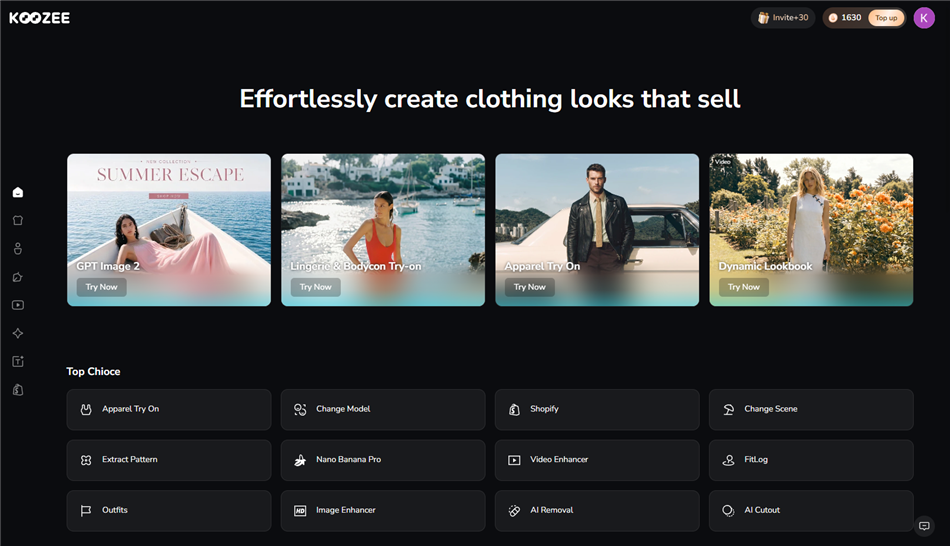
Go to Koozee's apparel workspace and upload your flat lay image. Koozee accepts standard image formats (JPG, PNG) and works directly from flat lay photos, product catalog images, or existing product shots. Koozee's specialized AI analyzes the garment's fabric shape, drape, and structural details—such as sleeve fall and neckline—to reconstruct how the garment naturally sits on a body. This is garment-aware processing, not generic image compositing.
💡 Pro tip: New users get free credits to test the tool before committing to a paid plan. Run your most challenging garment first — if the AI handles that well, it will handle the rest of your catalog.
Step 3: Set Your Model Reference, Pose, and Scene
Koozee lets you control the output by uploading a model reference image — a photo that defines the look, pose, or scene style you want.
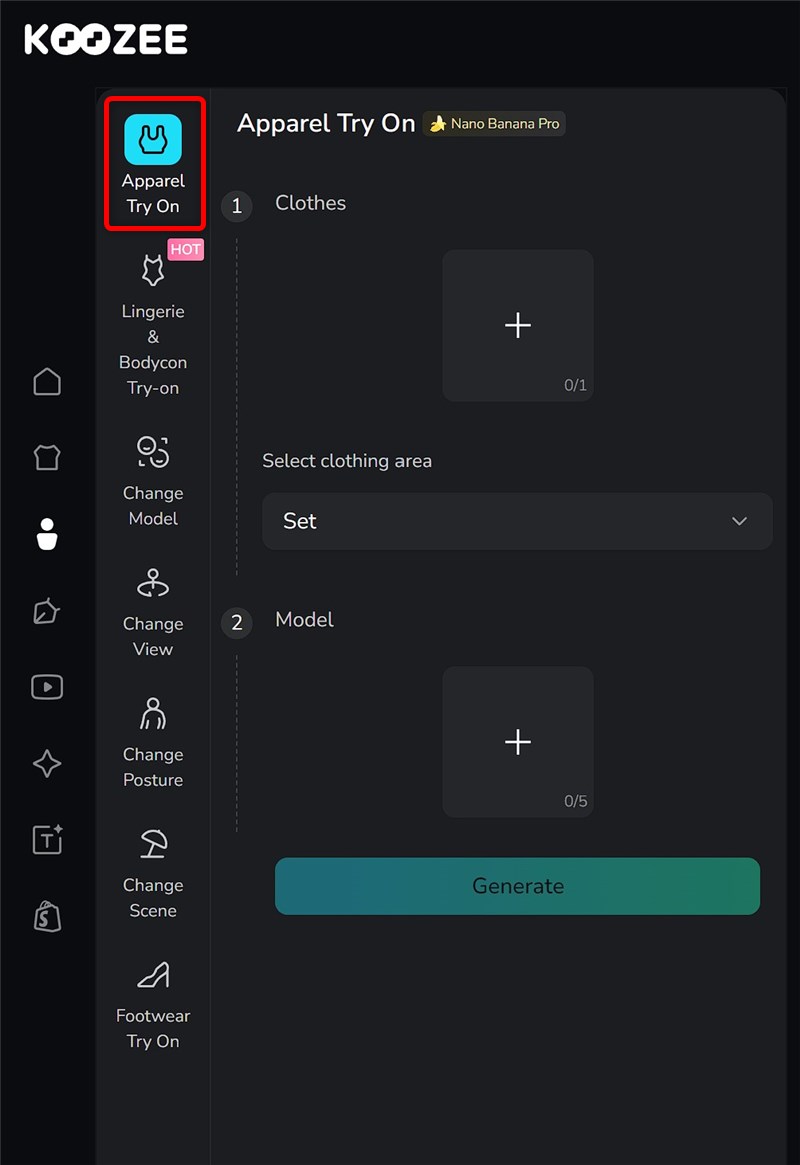
Next, upload your model reference image alongside the garment flat lay.
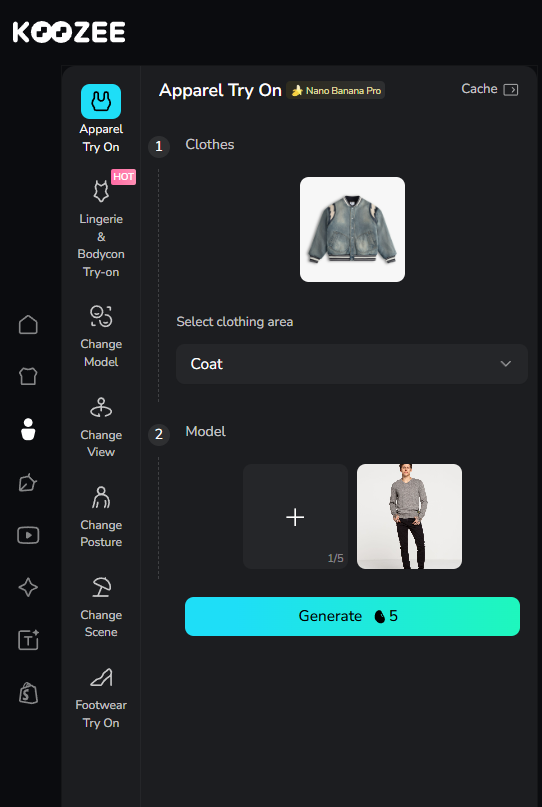
Koozee maps the garment onto the reference model, simulating how the fabric drapes and fits on that specific body.
Adjust and regenerate if the first output needs refinement — the reference image approach means you can iterate quickly without starting from scratch.
💡 Pro tip: For marketplace listings (Amazon, eBay, Shopify), use a clean studio-style reference with a front-facing pose. This matches buyer expectations and passes most marketplace image guidelines. Use lifestyle references for social media and campaign assets.
Step 4: Generate and Review
Submit your flat lay and settings. Most tools return results in 15–30 seconds.
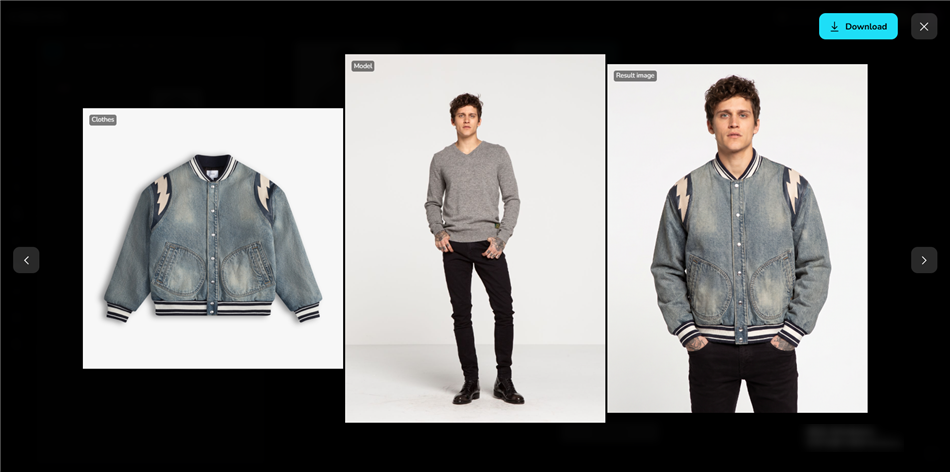
What to check before publishing:
Garment shape accuracy — does the neckline, hem, and sleeve length match your actual product?
Fabric texture and color — is the fabric color true to the original? Are prints, patterns, and logos preserved?
Drape and fit realism — does the garment hang and fit naturally on the model's body, or does it look pasted on?
Seam and construction details — are buttons, zippers, pockets, and stitching visible and accurate?
No artifacts — check for blurring, distorted limbs, or unnatural fabric edges around the model's body
⚠️ Warning: Never publish AI-generated model images without a human review step. AI tools can occasionally misread garment structure — especially for complex items like structured blazers, pleated skirts, or garments with unusual closures. A quick review before publishing protects your brand and reduces return risk.
Step 5: Export and Use in Your Listings
Once approved, export your on-model image in the resolution and format your platform requires. Most tools export as PNG or JPG at 1000–4000px.
Best AI Tools to Turn Flat Lay Clothing into Model Images
| Tool | Best For | Garment Fidelity | Shopify Integration | Pricing Model |
| Koozee | Apparel sellers needing a full visual workflow (try-on, videos, listing assets) | Apparel-optimized (High) — apparel-commerce trained | ✅ Yes | Credits-based |
| Claid AI | High-volume catalogs needing consistent output | High | Limited | Subscription |
| Botika | Shopify sellers needing fast review/fix workflow | Medium-High | ✅ Yes | Subscription |
| FASHN AI | API-first workflows and try-on pipelines | High | Via API | Pay-per-use |
| OnModel | Shopify bulk conversion | Medium | ✅ Yes | Subscription |
| Modelia | Testing with a free tier | Medium | Limited | Freemium |
| Photoroom | Quick edits and lightweight use | Medium | Limited | Freemium |
Flat Lay to Model AI: Tool Comparison by Use Case
| Scenario | Recommended Approach | Why |
| Single seller, small catalog (< 20 SKUs) | Freemium tool (Modelia, Photoroom) to test, then upgrade | Low volume doesn't justify the subscription cost upfront |
| Shopify seller, growing catalog | Koozee or Botika with Shopify integration | Reduces download/upload friction; keeps assets in one workflow |
| High-volume catalog (100+ SKUs) | Claid AI or Koozee for batch consistency | Consistent model identity and style across large SKU sets |
| Lingerie/swimwear / bodycon seller | Koozee | Purpose-built for intimate apparel, general tools often restrict these categories |
| Seller needing images + videos | Koozee | Covers both static model images and apparel video generation |
| API / developer integration | FASHN AI or VModel | Strong API documentation and pay-per-use pricing |
How to Preserve Fabric Drape and Fit When Turning Flat Lays into Model Images
Generic AI tools treat clothing as flat textures, resulting in unrealistic "cut-and-paste" images. To ensure your AI visuals help preserve garment details, follow these quick rules:
Preserve Natural Structure: Don't over-flatten the garment during your flat lay shoot; let its natural A-line flare or structured shoulders show so the AI can read its physics.
Match Body Type to Fit: Choose an AI model silhouette that matches the garment's target design (e.g., slim-fit items on slim models, relaxed items on relaxed models) to avoid distortion.
Match Poses to Garment Type: Use standing/walking poses for flowing dresses to show movement, and upright, front-facing poses for structured blazers.
Focus on Stress Points: When reviewing your outputs, pay close attention to critical transition zones—shoulder seams, armholes, waistlines, and hems—where generic AI is most likely to fail.
FAQ
What is a flat lay to model AI?
Flat lay to model AI is a category of artificial intelligence tools that convert flat-lay clothing photographs into realistic images of models wearing those garments. The AI analyzes the garment's shape, fabric, color, and structure, then generates a photorealistic on-model image — without a physical photoshoot.
How do I turn flat lay clothing into model images?
Upload your flat lay photo to an AI tool that supports garment-to-model conversion (such as Koozee, Claid.ai, or Botika), select a model type, pose, and background, then generate the image. Most tools return results in under a minute. Review the output for garment accuracy before publishing.
How do I preserve fabric drape and fit when turning flat lays into model images?
Use a clean, wrinkle-free flat lay on a neutral background. Choose a model body type that matches your garment's intended fit. Select a pose that suits the garment's structure. Use an apparel-specific AI tool (not a generic image generator) — these tools are trained on clothing data and better simulate how fabric drapes and fits on a body.
What types of clothing work best for flat lay to model AI?
Structured garments — tops, dresses, jackets, trousers, and knitwear — generally produce the best results. Sheer fabrics, heavily layered outfits, and garments with complex construction (like tailored suits with multiple layers) can be more challenging.
Will the AI preserve my garment's colors, prints, and logos?
High-quality apparel AI tools are designed to preserve garment details, including color, print patterns, logos, and text. However, very fine print details or small text may not always render perfectly. Always review output images before publishing, especially for branded or printed garments.
Can I choose the model's body type, skin tone, and pose?
Yes — most flat-lay-to-model AI tools offer a library of AI models with different body types, skin tones, ethnicities, and poses. The range varies by tool. Tools built for apparel e-commerce typically offer more model diversity and pose options than general-purpose image tools.
Can AI-generated model images help product pages perform better?
Yes. Industry benchmarks show that introducing on-model photography lifts conversion rates by 20% to 30% compared to flat product shots, while reducing return rates by clearly showing fit and drape.
Beyond saving photoshoot costs, apparel AI allows merchants to scale these gains instantly. It gives brands the flexibility to showcase a single garment across diverse body frames and localized backgrounds—unlocking a level of audience personalization that traditional photoshoots cannot match.
Can I use flat lay to model AI for lingerie and swimwear?
Yes, but not all tools support these categories. Many general-purpose AI tools restrict intimate apparel due to content safety policies. Tools built specifically for apparel e-commerce — like Koozee — include purpose-built workflows for lingerie, swimwear, and bodycon clothing, keeping the focus on product presentation for legitimate e-commerce use.